
Player guide
QSE Football Player Guide
Everything about calling a QSE Football game - every formation, play and option on offense and defense, special teams, the clock, saving, leagues and head-to-head.
In QSE Football you are the play-caller. You pick the formation and the play on offense, the front and the coverage on defense, and every special-teams and clock decision, while your offensive and defensive coordinators suggest a call on every down.
Quick start
- Sign in, open Football from the Games menu and choose Play Exhibition.
- Pick the two teams (you are the home team), a level (Beginner or Expert) and the computer's difficulty, then press Kickoff!
- On offense, pick a formation, then a play. On defense, pick a front, then a coverage or blitz. Or press Use OC Call / Use DC Call to take your coordinator's suggestion.
- The game saves after every play. Save and Quit takes you back to the Football hub.
Free play and subscriptions
| Free account | Football subscription or Premium | |
|---|---|---|
| Exhibition games | The included season, one new game per Eastern day | The included season, as many as you like; any other season with that season's pass |
| Head-to-Head | Counts as your one game of the day (for both players) | Included |
| Season Replay, Dynasty Replay and Redraft | — | Included |
| Expert computer difficulty | — | Included |
- A free game you have started can be resumed later; resuming doesn't use up a game, and quitting doesn't give one back. A new free game is available after midnight Eastern.
- A season pass is a one-time purchase that stays in your account. On the website, playing that season also needs an active Football subscription, or Premium; in the Windows desktop app (coming soon) it plays offline without one.
- Codes: a discount code goes in the Promo code box at checkout. A code for a free season goes in Redeem a code on Plan & billing, where you pick the season.
- Seasons you can't play yet show a lock on the setup page.
Setting up an exhibition
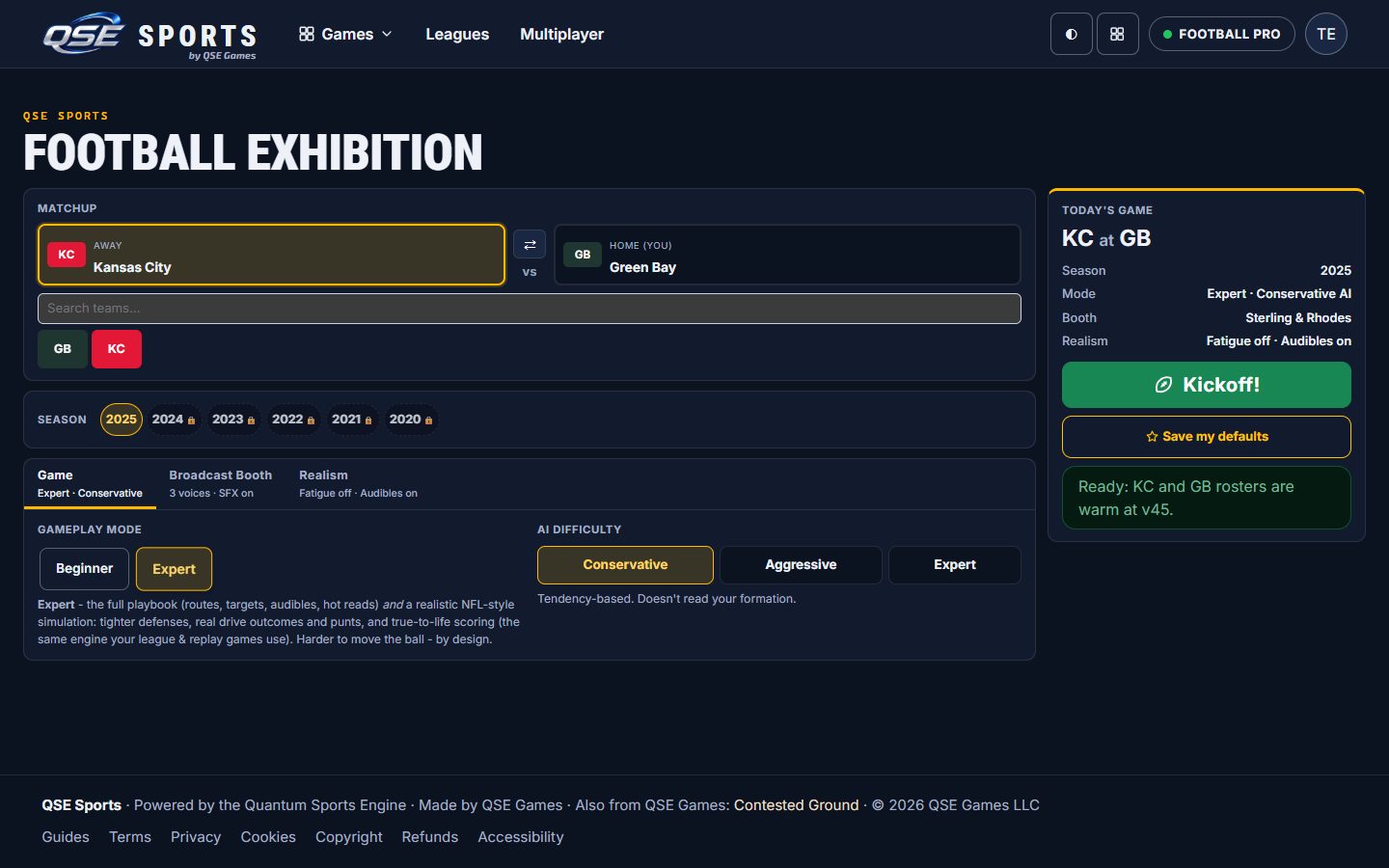
- Season and teams. Pick the away team and Home (You); you always play the home side.
- Game tab:
- Level: Beginner or Expert (see the next section).
- Computer difficulty: Conservative ("tendency-based, doesn't read your formation"), Aggressive ("more blitzes, deep shots, 4th-down gambles") or Expert ("reads your formation; audibles, double-covers, QB spies"). Expert difficulty needs a subscription.
- Realism tab: Player Fatigue (beta, off to start; this game only), Allow Audibles (on to start - it turns the pre-snap read on), and the National Anthem (full, short, or skip).
- Broadcast Booth tab: the announcer, colour analyst and referee voices (each with a Preview button, or None), and sound effects on or off.
- Save my defaults remembers your difficulty and voices for next time. Quarters are always 15 minutes.
Levels and difficulty
| Beginner | Expert | |
|---|---|---|
| Offense | Run inside or outside, or pass short, medium or deep to the left, middle or right | Every formation and play, plus the More calls options and audibles |
| Defense | Four choices: Stack Box, Sell Out, Play Safe, Bring Heat | Every front and coverage or blitz, plus the call details |
| Pre-snap read | No | Yes, with Allow Audibles on |
| Scoring | Forgiving, arcade-style | The full game engine your league and replay games use |
- League and playoff games are always played at Expert.
- Intermediate appears only when you create a Head-to-Head game. Once the game starts it plays like Expert.
- Some extras follow the computer's difficulty, not your level: with Expert difficulty you get your quarterback's coverage read on offense and the defensive coordinator's read on defense, and the film breakdown starts switched off.
Game views
Pick a view at the top of the game screen. Desktop starts in Broadcast, phones in Standard, and your choice is remembered in this browser.
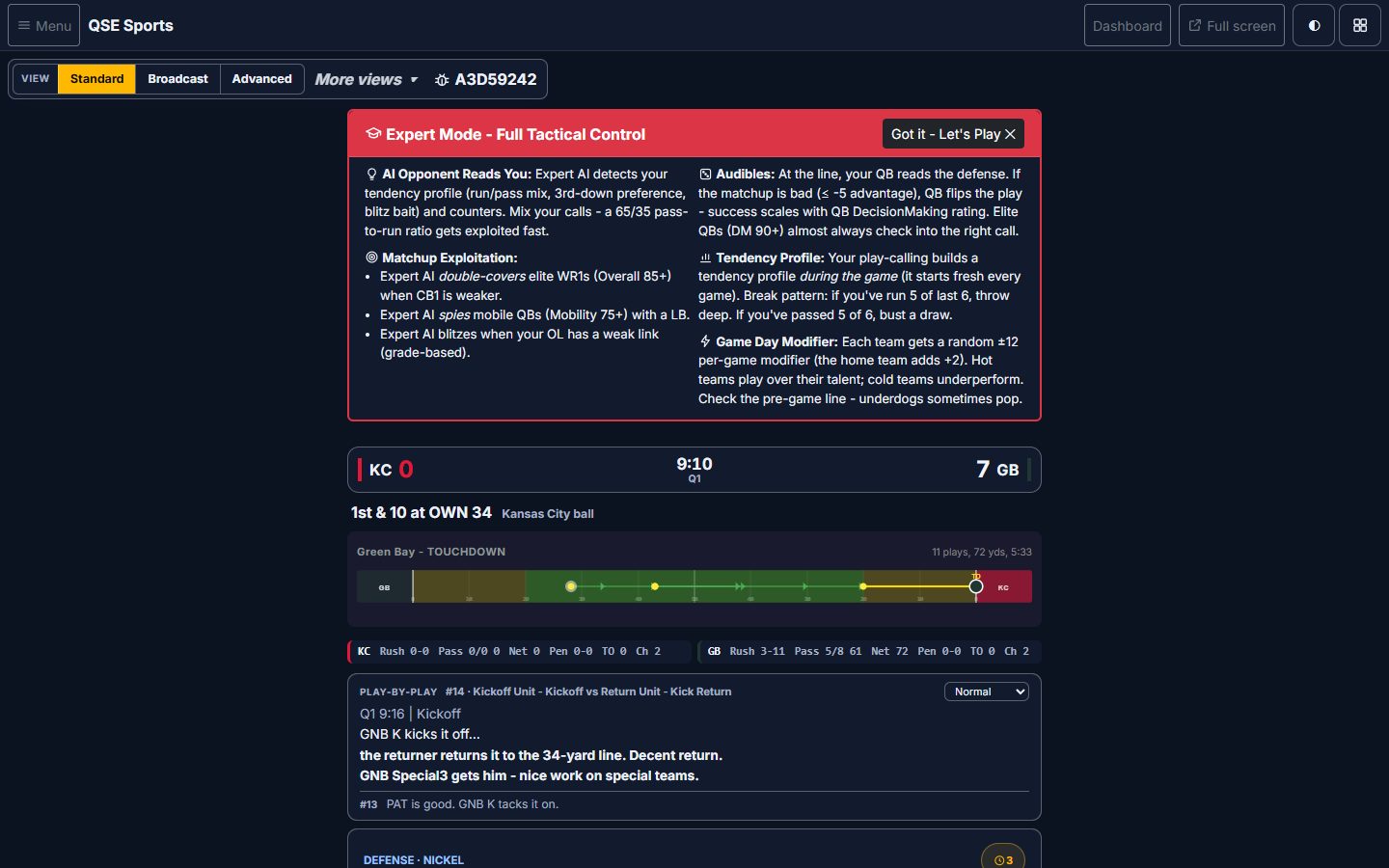
- Standard - coordinator-led and made for phones: a compact scoreboard, the call sheet, and everything else in a More drawer.
- Broadcast - a TV-style field, scoreboard and call sheet.
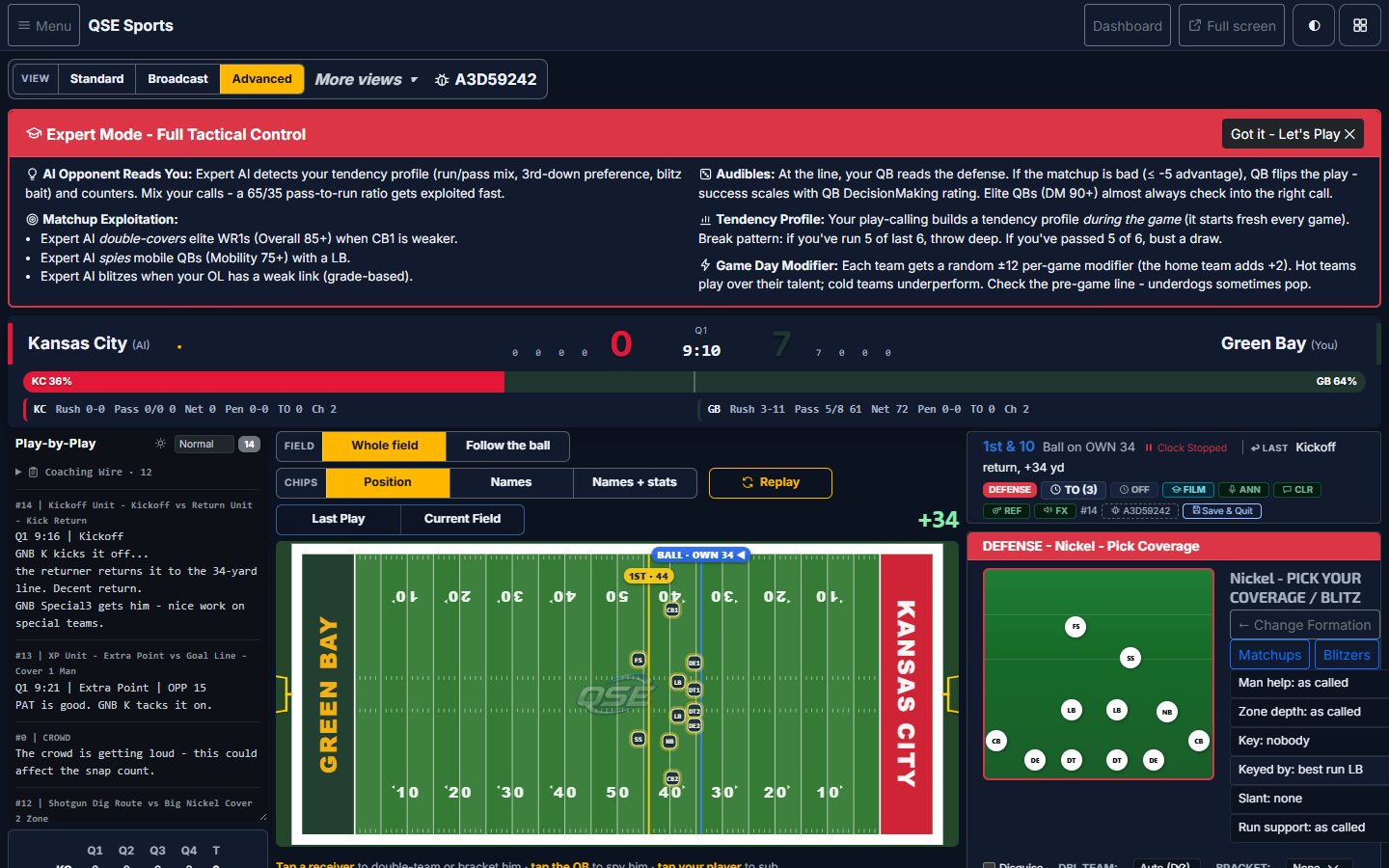
- Advanced - every panel and control, with the full-size field. Full View links take you here.
- More views: Classic, Drive Deck and Snap Flow.
The game screen
- Scoreboard: teams, score, timeouts, clock, quarter, and the current drive (plays, yards, time).
- Field: Last Play, Current Field and Replay. Field chips can show Position, Names or Names + stats. In Advanced, Whole field shows all 120 yards and Follow the ball a closer window that moves with the ball during the play, as the Broadcast camera does.
- Play-by-play: speed Instant, Fast, Normal (to start), Dramatic or Extra slow.
- Game tools: Box, Injuries, Reads, Scout, Keys, Replay, Drive, Depth, Units, Field, Wire, Help, and Fatigue when fatigue is on.
- Under the call sheet: the audio mixer and voices, Film, Ref and FX on or off, Big-Play Moments, Save and Quit and Full View.
- Sim Ahead: Drive, Quarter, Halftime or End (asks you to confirm), or Watch drive / Watch rest of game. Auto Snap plays the coordinator's call for you.
- After a play, a coaching card can explain why it worked or failed - for example a run straight into a front built to stop it - and what would have done better.
Calling offense
The Offensive Playbook draws every formation and play the way the call sheet does, with the defensive calls each play beats.
Beginner offense
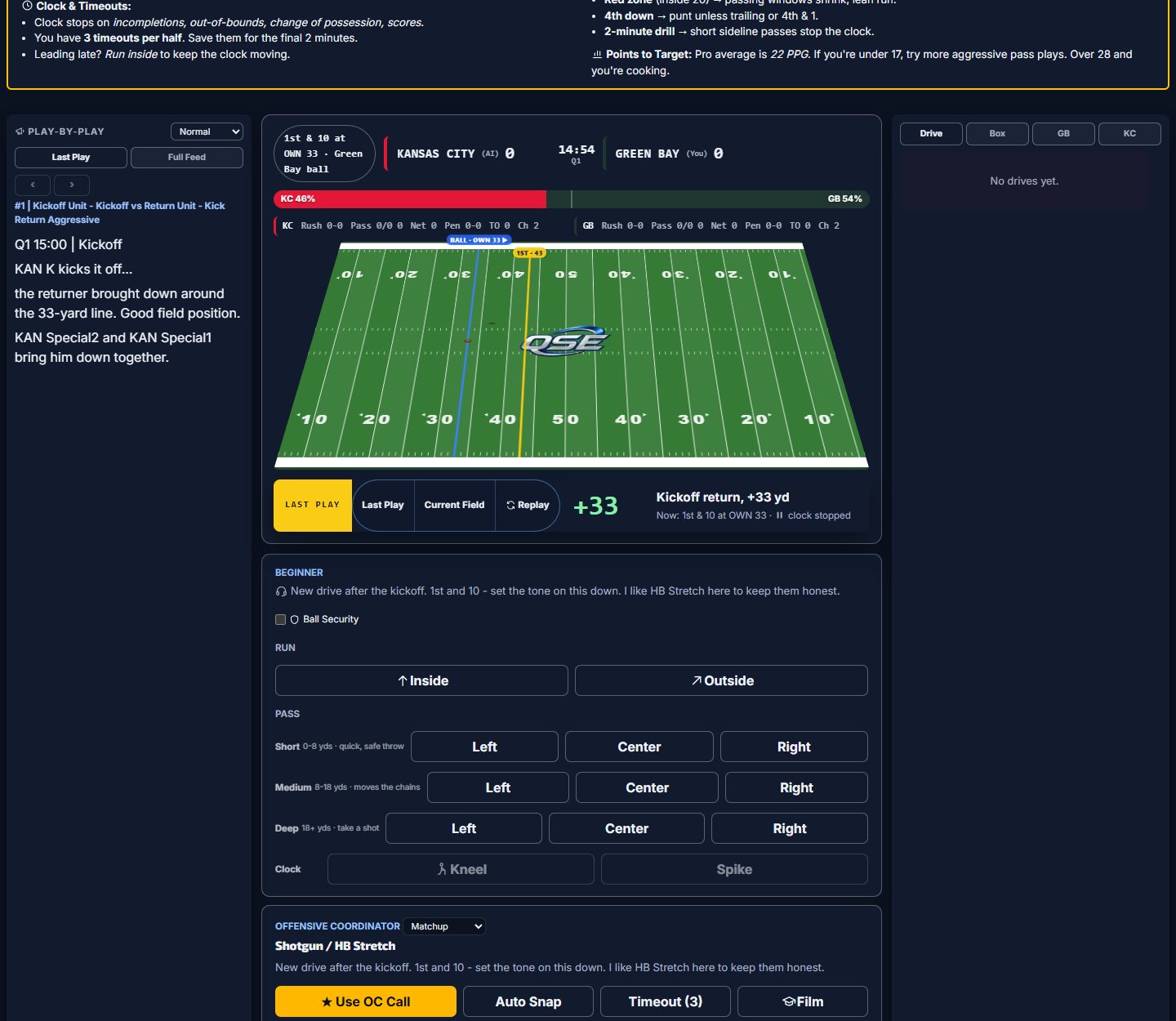
- Run: Inside (an I-Formation dive, or a quarterback sneak with a yard or less to go) or Outside (a stretch run).
- Pass: Short (0-8 yards), Medium (8-18) or Deep (18+), each to the Left, Center or Right. All passes come from the shotgun.
- Ball Security (Broadcast and Standard views), and Kneel and Spike for the clock.
- On 4th down: Punt, Coffin and FG with its make chance when in range, and Draw Offside on 4th and 2 or less. You can also simply run or pass to go for it.
Formations
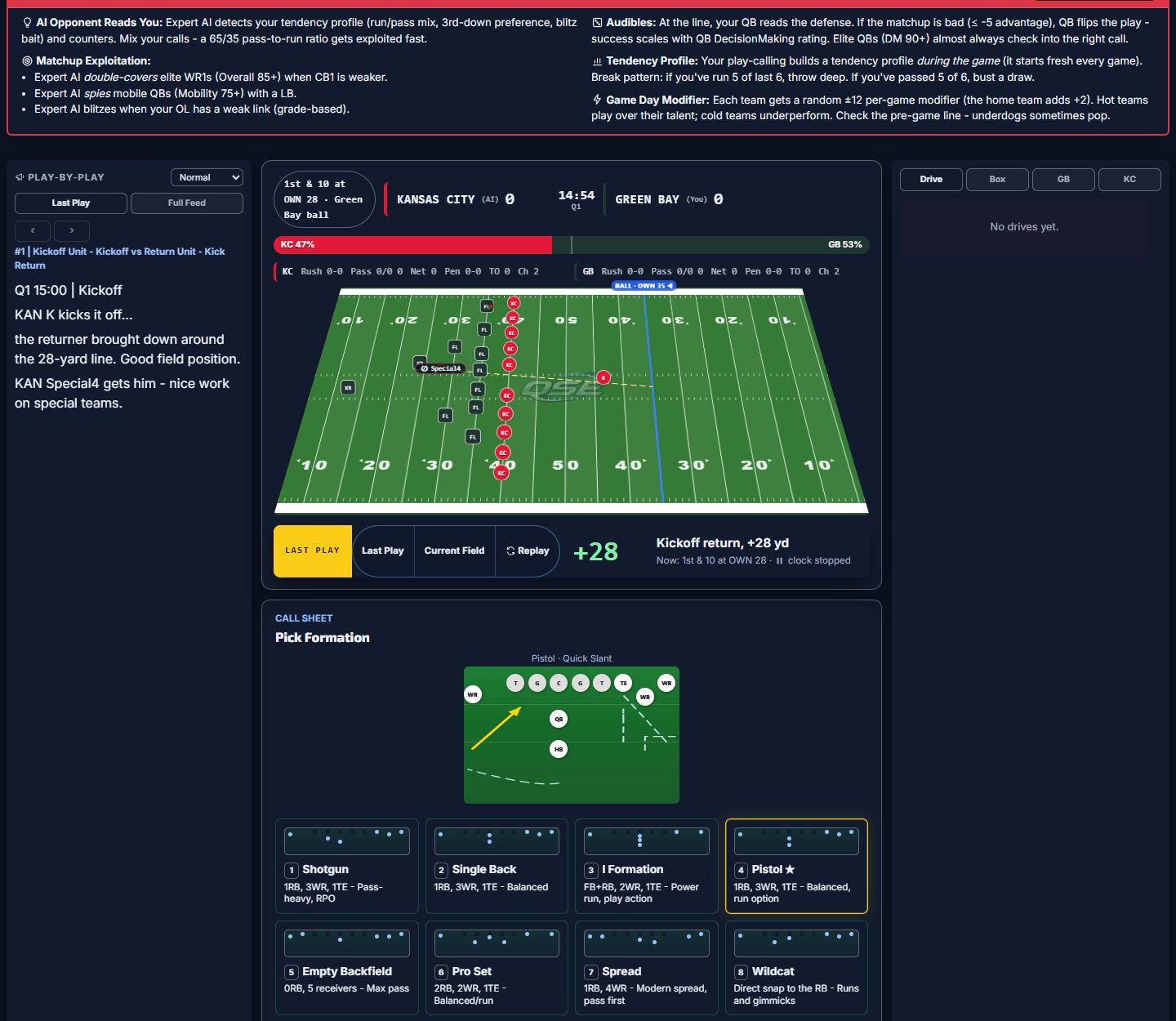
On a normal down you choose from eight formations. Goal Line and Jumbo Package join them inside the opponent's 5 or with 2 yards or less to go.
| Formation | Personnel | Built for |
|---|---|---|
| Shotgun | 1 RB, 3 WR, 1 TE | Pass-heavy, run-pass options |
| Single Back | 1 RB, 3 WR, 1 TE | Balanced |
| I Formation | FB + RB, 2 WR, 1 TE | Power run, play action |
| Pistol | 1 RB, 3 WR, 1 TE | Balanced, run option |
| Empty Backfield | No back, 5 receivers | Maximum pass |
| Pro Set | 2 RB, 2 WR, 1 TE | Balanced, leaning run |
| Spread | 1 RB, 4 WR | Pass first |
| Wildcat | Direct snap to the running back | Runs and gimmicks |
| Goal Line | FB + RB, 1 WR, 2 TE | Short-yardage power |
| Jumbo Package | Extra lineman, FB + RB | Maximum push |
- Shotgun, Single Back, Pistol, Empty and Spread also offer an alignment: 2×2, Trips R, Trips L, Bunch, Twins or Stack. It changes how the receivers line up on the picture.
- In No Huddle your personnel is locked, so you can only switch between formations that use the same players (the sheet says Personnel locked).
Plays
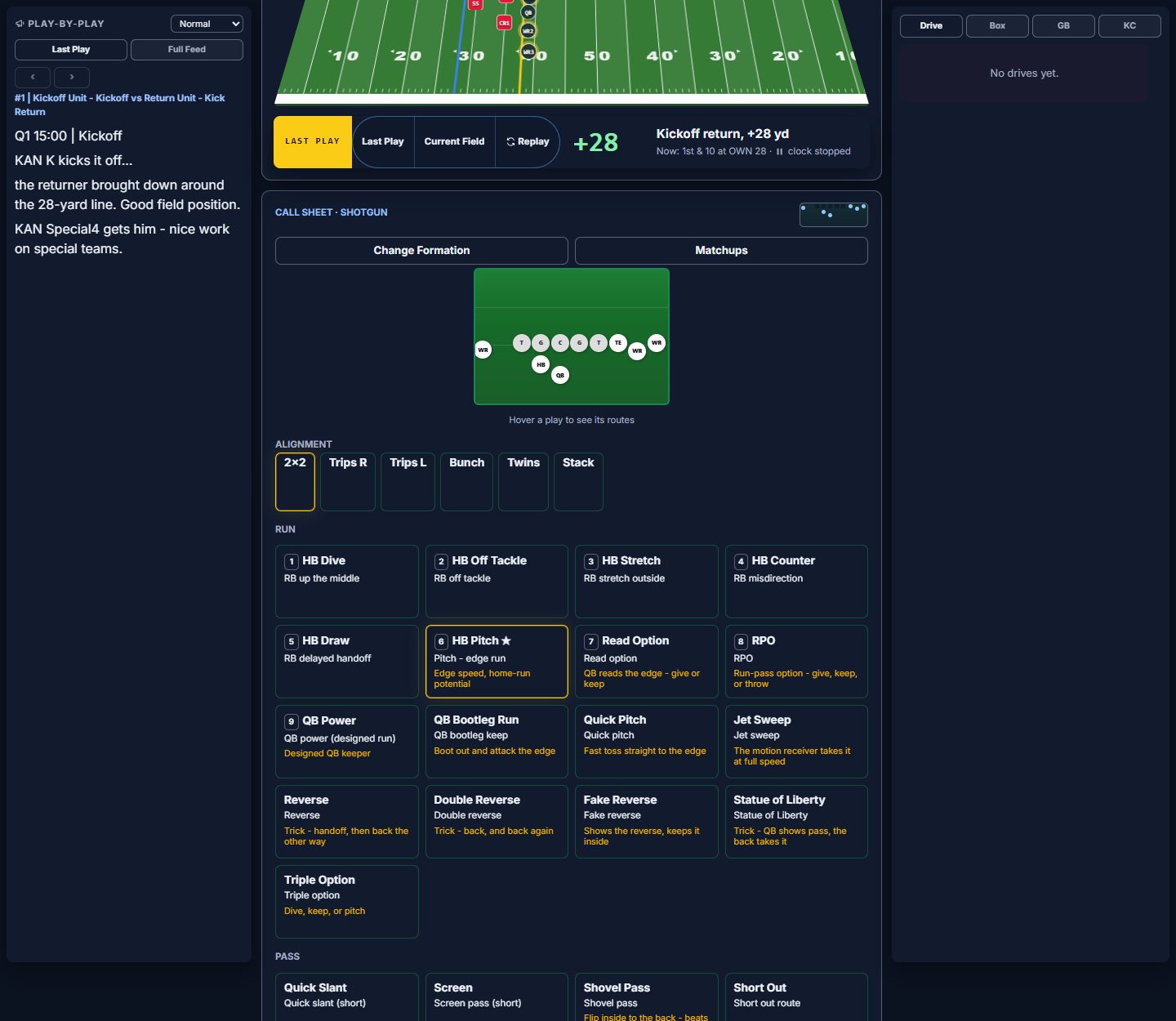
Each formation's sheet lists its runs and then its passes. The starred card is your offensive coordinator's call.
- Running back runs: HB Dive, HB Off Tackle, HB Stretch, HB Counter, HB Draw and HB Pitch.
- More runs: Quick Pitch, Reverse, Double Reverse, Fake Reverse and Statue of Liberty. Jet Sweep comes from Shotgun, Single Back and Pistol, and Triple Option from Pistol, Shotgun and I Formation.
- Quarterback runs (Shotgun and Pistol): Read Option, RPO, QB Power and QB Bootleg Run. With 1 yard to go, QB Sneak and Tush Push appear.
- Short passes: Quick Slant, Screen, Shovel Pass, Short Out, Check Down and Short Cross.
- Medium passes: Curl, Out, Mesh, Dagger, and the concepts Flood, Levels, Stick, Sail and Drive, plus the Comeback.
- Deep passes: Deep Post, Four Verts, Slant-and-Go and Smash.
- Situational: a Fade inside the opponent's 10, and a Hail Mary in the last 30 seconds of a half or overtime from outside the opponent's 25.
- Play action (Short, Deep or Boot) comes only from I Formation, Single Back, Pistol and Pro Set, plus a short play-action pass from Goal Line.
- Special formations: Spread has its own runs (inside zone, draw, stretch, jet sweep, QB power, RPO) and no play action. Goal Line has power runs and a fade. Jumbo is runs only. Wildcat has six runs, a WR end-around, a direct-snap trick and a short pop pass.
- In the Advanced view (in your own games, not head-to-head), the six running-back runs become eight blocking schemes: Inside zone, Duo, Power, Counter, Outside zone, Pull-lead, Toss and Draw, each showing how often the team runs it and the lead back's yards per carry.
More calls
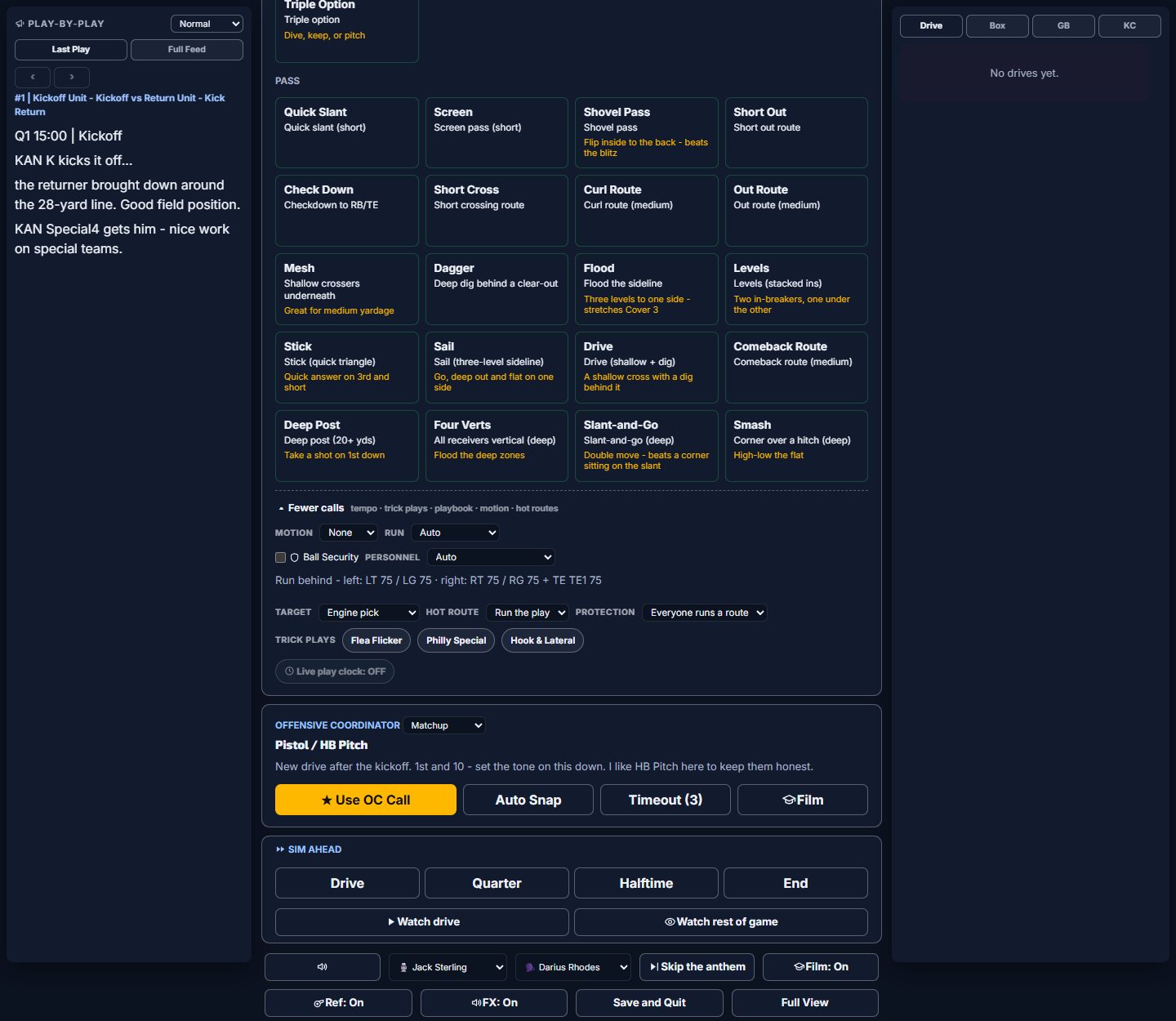
Open More calls under the play cards (in Advanced these are always shown). Unless it says otherwise, a choice lasts one snap.
- Tempo (with the formations): Normal (28-43 seconds a play), Hurry Up (18-25), No Huddle (8-15) or Burn Clock (38-45). Hurry after 1st switches you to Hurry Up after each first down.
- Auto-manage clock: in the last two minutes of a half, the game hurries when you are behind and burns the clock when you lead in the 4th quarter.
- Timeout after this play: in the last two minutes of a half, take a timeout as soon as the play ends.
- Motion: None, Auto, Jet, Orbit, Across, Return or Fly, and which receiver goes. Motion helps against man coverage. There is no motion on kicks, spikes, kneels, sneaks or the Tush Push.
- Run: Auto, Left or Right (strong). The sheet names the tackle and guard you are running behind and their blocking ratings.
- Ball Security: fewer fumbles and interceptions, a little less gain. It stays on until you turn it off.
- Personnel: Auto, 11, 12, 21, 13 or 10. It stays set.
- Target: Engine pick, WR1, WR2, WR3 / Slot, TE, or RB (checkdown) - your quarterback's first read.
- Hot route (after you pick a target): change that receiver's route to Slant, Hitch, Curl, Drag, Out, In / Dig, Comeback, Post, Corner, Go, Fly / fade, Wheel or Screen. It is a bet against the coverage, and it can lose as well as win.
- Protection: Everyone runs a route, RB stays in, TE stays in, or RB + TE stay in. Fewer receivers, a cleaner pocket. The man kept in shows BLK on the field. It never applies to your chosen target, and it is dropped on a run.
- Trick plays (1st or 2nd down, outside the opponent's 20): Flea Flicker, Philly Special and Hook & Lateral.
- My Playbook: your saved plays (edit them with Edit ✎). Repeat reruns your last call.
The pre-snap read and audibles
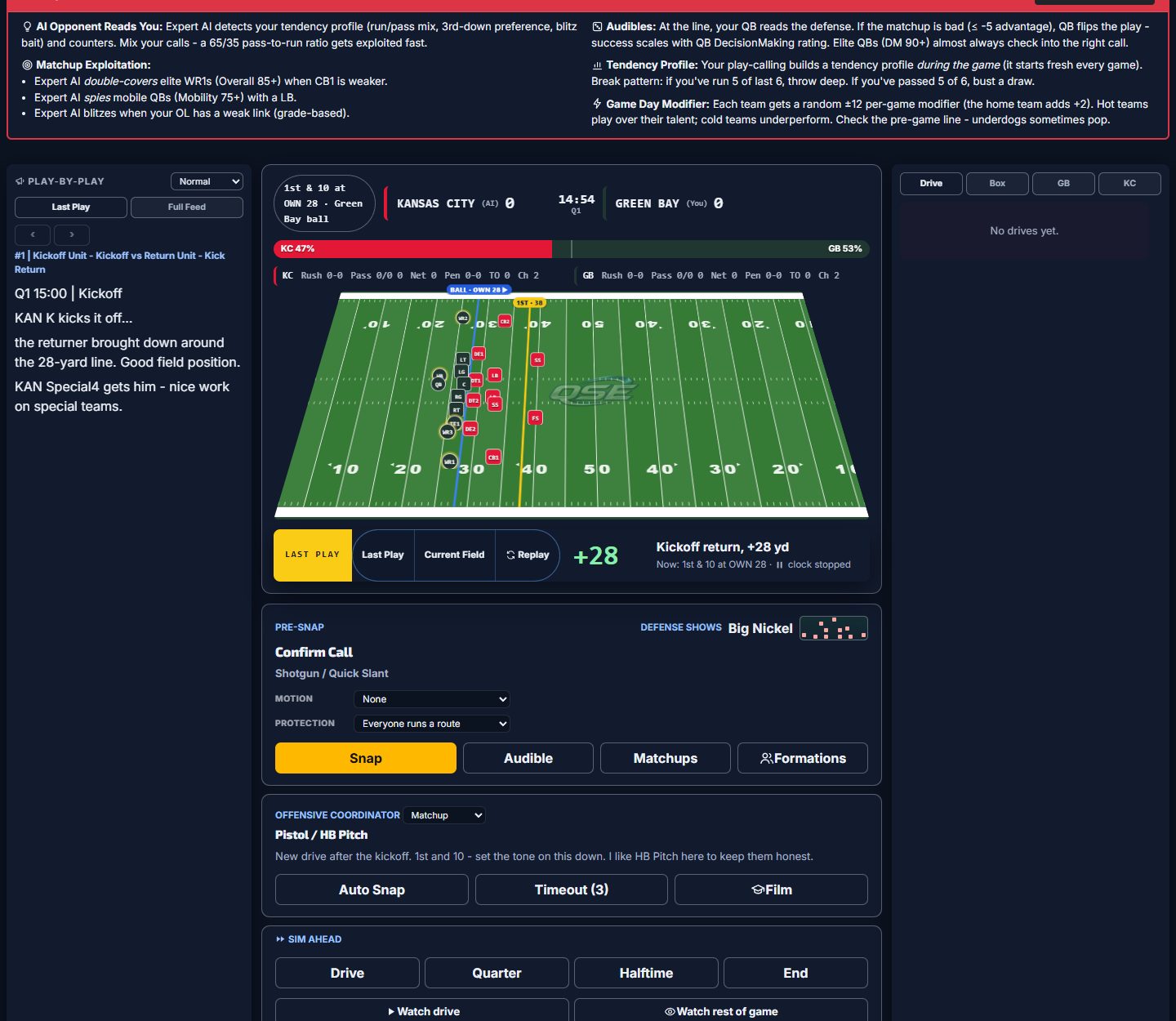
With Allow Audibles on (and above Beginner), after you call a play you see the defense line up:
- Defense Shows names its formation and draws its front. The coverage stays hidden.
- You can change Motion and Protection, or press Snap, Audible, Matchups or Formations.
- You get one audible per play. The defensive coordinator can answer it once. When you audible, formation cards say ✓ same (same players) or subs.
- With Expert computer difficulty you also get your QB read: a coverage guess (it can be wrong), a blitz warning, and each receiver marked MISMATCH, COVERED or DOUBLED. Pressing Target on a mismatch makes him the first read.
Fourth down
- Out of field-goal range: Punt, Rugby, Directional or Fake Punt, and how hard your gunners cover (Conservative, Balanced or Aggressive).
- In range: FG with its distance and make chance, and Fake FG. Deep in their territory with a long kick you can also Coffin punt. Field-goal range starts at the opponent's 45.
- Always: Go for it. On 4th and 2 or less: Draw Offside - a hard count with no snap. About one time in six the defense jumps; about one in six your own line moves; otherwise it's delay of game.
After the play
- OC match-up read: who was open on your last pass (the Reads tab in Broadcast).
- "What were they in?" Now and then after your own pass plays, a quick quiz asks you to name the coverage you just faced.
Calling defense
The Defensive Playbook draws every front and call, with the plays each call stops and the ones that beat it.
Beginner defense
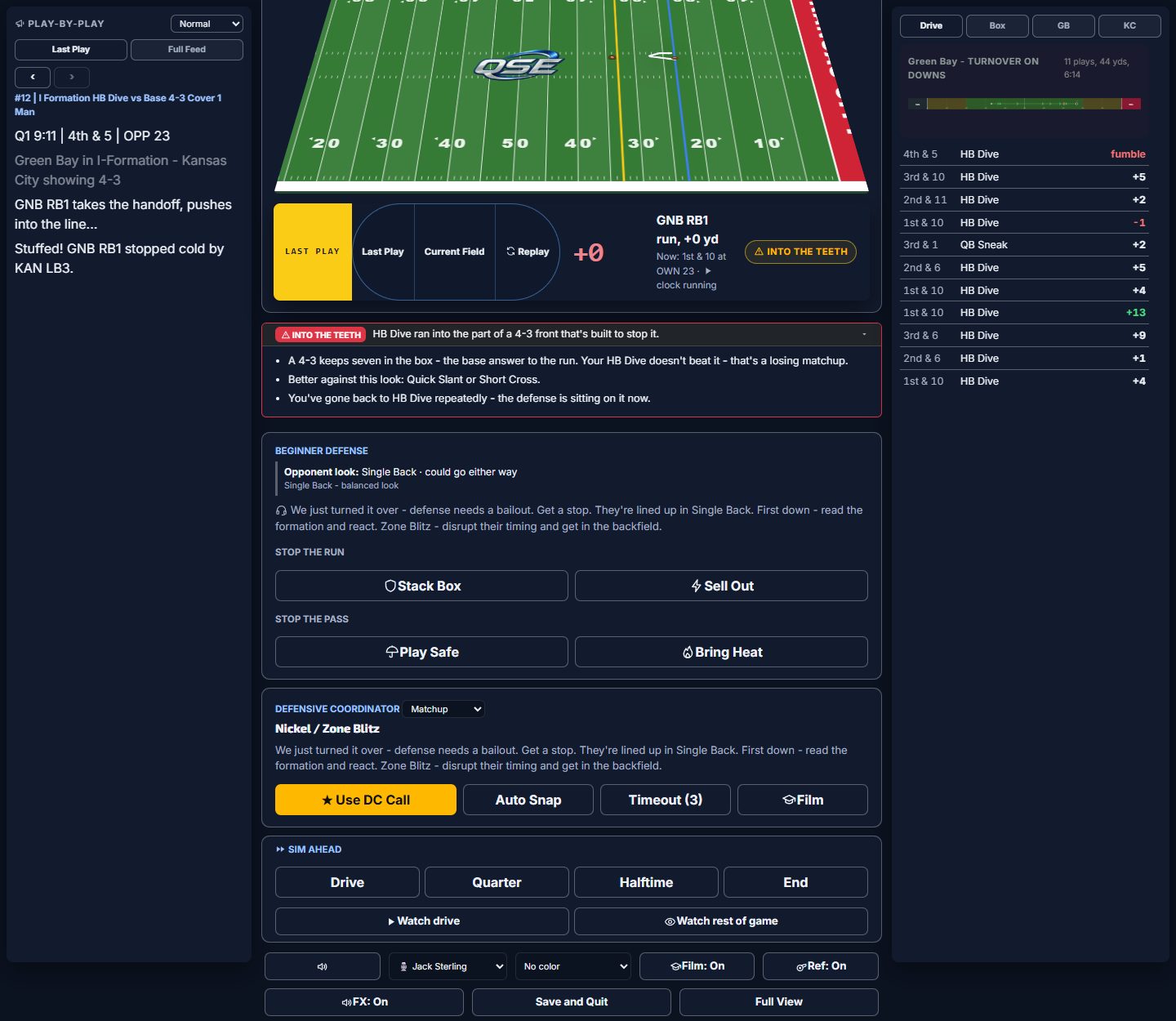
| Choice | What you call |
|---|---|
| Stack Box (stop the run) | Base 4-3, Cover 3 Zone |
| Sell Out (stop the run) | Four Six Bear, Linebacker Blitz |
| Play Safe (stop the pass) | Nickel, Cover 2 Zone |
| Bring Heat (stop the pass) | Dime, Zone Blitz |
Your defensive coordinator may also double-team an elite receiver for you.
Fronts
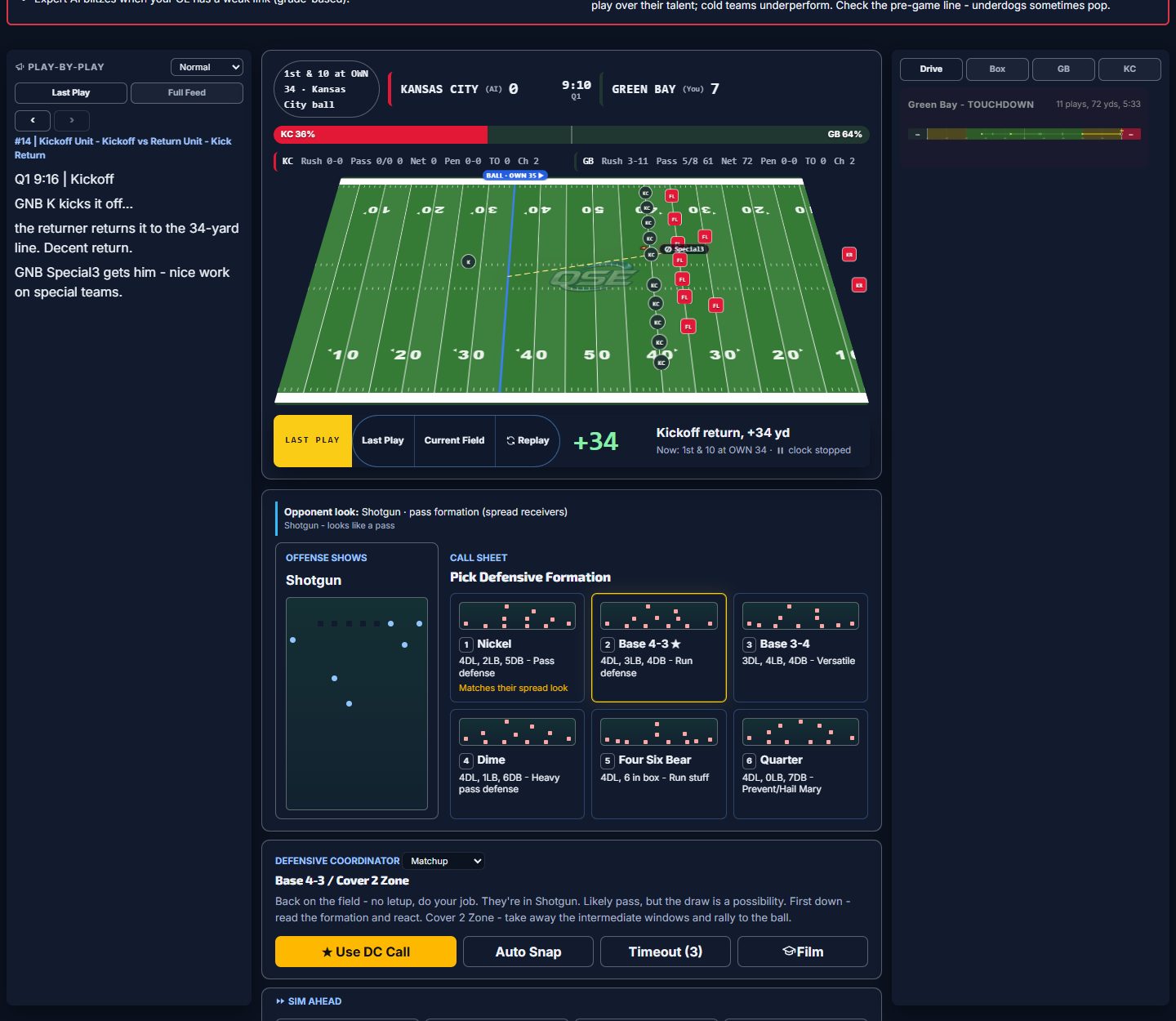
| Front | Personnel | Built for |
|---|---|---|
| Nickel | 4 DL, 2 LB, 5 DB | Pass defense |
| Base 4-3 | 4 DL, 3 LB, 4 DB | Run defense |
| Base 3-4 | 3 DL, 4 LB, 4 DB | Versatile |
| Dime | 4 DL, 1 LB, 6 DB | Heavy pass defense |
| Four Six Bear | 4 DL, 6 in the box | Stopping the run |
| Quarter | 4 DL, 0 LB, 7 DB | Prevent, Hail Mary |
| Goal Line | 5+ DL, 3 LB, 3 DB | Short yardage - offered when the offense is in its Goal Line formation |
| Big Nickel | 4 DL, 2 LB, 3 CB, 3 S | A run-heavy nickel - it appears when your coordinator calls it or in a saved call |
Against a No Huddle offense your personnel is locked while theirs is: the base fronts (4-3, 3-4, Four Six Bear, Goal Line) can only switch among themselves, and so can the nickel fronts (Nickel, Dime, Quarter). A note above the fronts says when the lock is on, and your coordinator's call stays inside it. When the offense changes personnel - say from a two-back set to an empty backfield - you can substitute too.
Calls
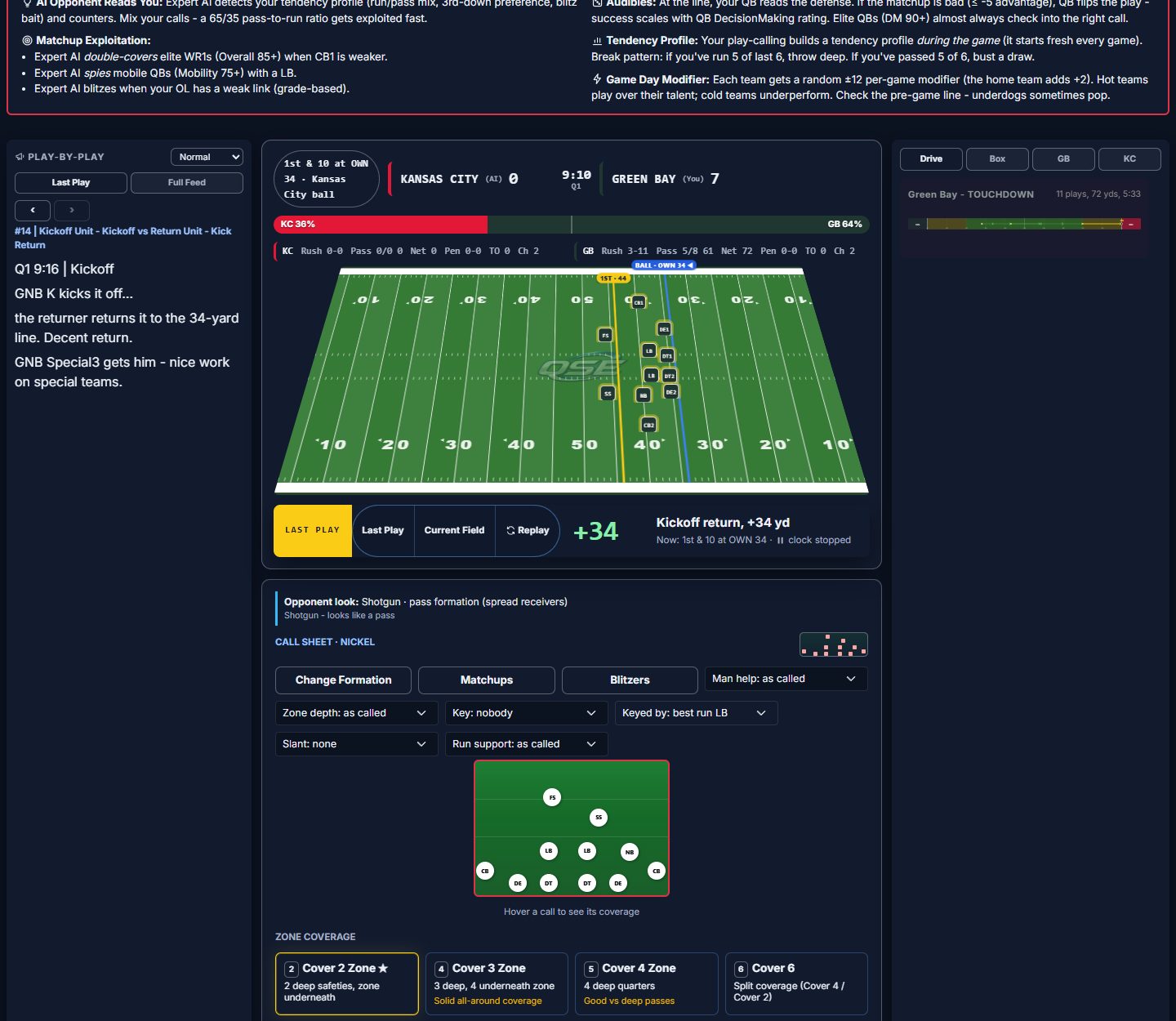
Every front offers these, grouped on the sheet as Zone Coverage, Man Coverage, Blitz Packages and Special:
| Call | What it is | Fronts |
|---|---|---|
| Cover 1 Man | Man coverage, one deep safety | All |
| Cover 2 Man | Two deep safeties, man underneath | All |
| Cover 2 Zone | Two deep safeties, zone underneath | All |
| Cover 3 Zone | Three deep, four underneath | All |
| Cover 4 Zone | Four deep quarters | All |
| Cover 6 | Split coverage: quarters on one side, Cover 2 on the other | All |
| Linebacker Blitz, Safety Blitz | One extra rusher | All |
| Zone Blitz | A blitz with zone behind it | All |
| Corner Blitz, All Out Blitz | All Out sends two named rushers | Nickel, Big Nickel, Dime, 4-3, 3-4, Four Six Bear |
| Cover 0 Man Blitz | All-out man blitz, two rushers | Nickel, Big Nickel, 4-3, 3-4 |
| Spy QB | A defender shadows the quarterback: designed QB runs lose about 40% of their gain, and shovel passes suffer | All |
| Prevent Defense | Everyone deep | Quarter |
There is no separate run call: you stop the run with your front, your blitzes and the call details below.
Call details
In Broadcast, Advanced, Classic, Drive Deck and Snap Flow (not in Standard or on phones), the call sheet has these controls:
- Matchups: which of your corners covers which of their receivers, or Auto. It stays set for the game and applies to every call, including Use DC Call.
- Blitzers: name up to three rushers from LB1-LB3, SS, FS and CB1-CB3, each with his rush rating. Each one adds pressure, and the man he would have covered comes open. They apply to your next call only if it is a blitz - any call you make clears them.
- Man help: As called, Over the top, or Robber - for Cover 1 Man and Cover 2 Man. Over makes deep throws harder and quick throws easier; Robber the reverse. It stays set for the drive.
- Zone depth: As called, Short or Deep - for Cover 2 Zone, Cover 3, Cover 4 and Cover 6. Deep takes away the deep ball and gives up room underneath; Short the reverse. It stays set for the drive.
- Key: one of their backs. His runs face one more defender; passes get a little easier. Keyed by picks who does the keying (to start, your best run-stopping linebacker on the field). His run defense decides how much the key helps, and he is more likely to make the tackle. One snap.
- Slant: to their left, to their right, pinch inside, or wide. Runs toward the slant lose ground, runs away from it gain; pinch takes away inside runs, wide the edges. One snap.
- Run support: bring a safety down into the box - one more against the run, a little easier to pass over the top. One snap.
Use DC Call plays your coordinator's call exactly: it uses your Matchups but none of the other details (they stay set for your own calls). On 3rd or 4th down with 5 or more to go he never recommends Four Six Bear or Goal Line - not even under a run-stopping game plan.
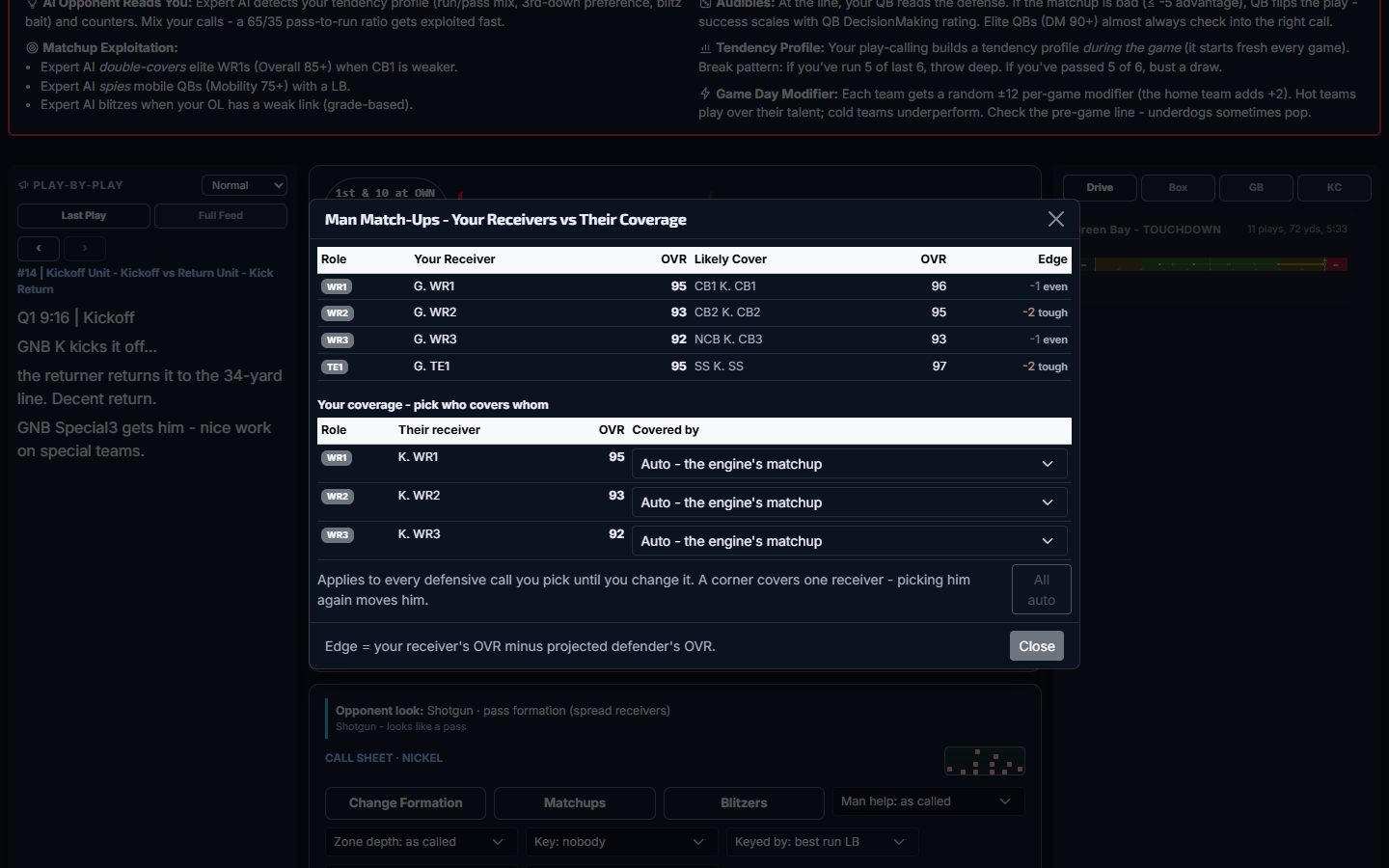
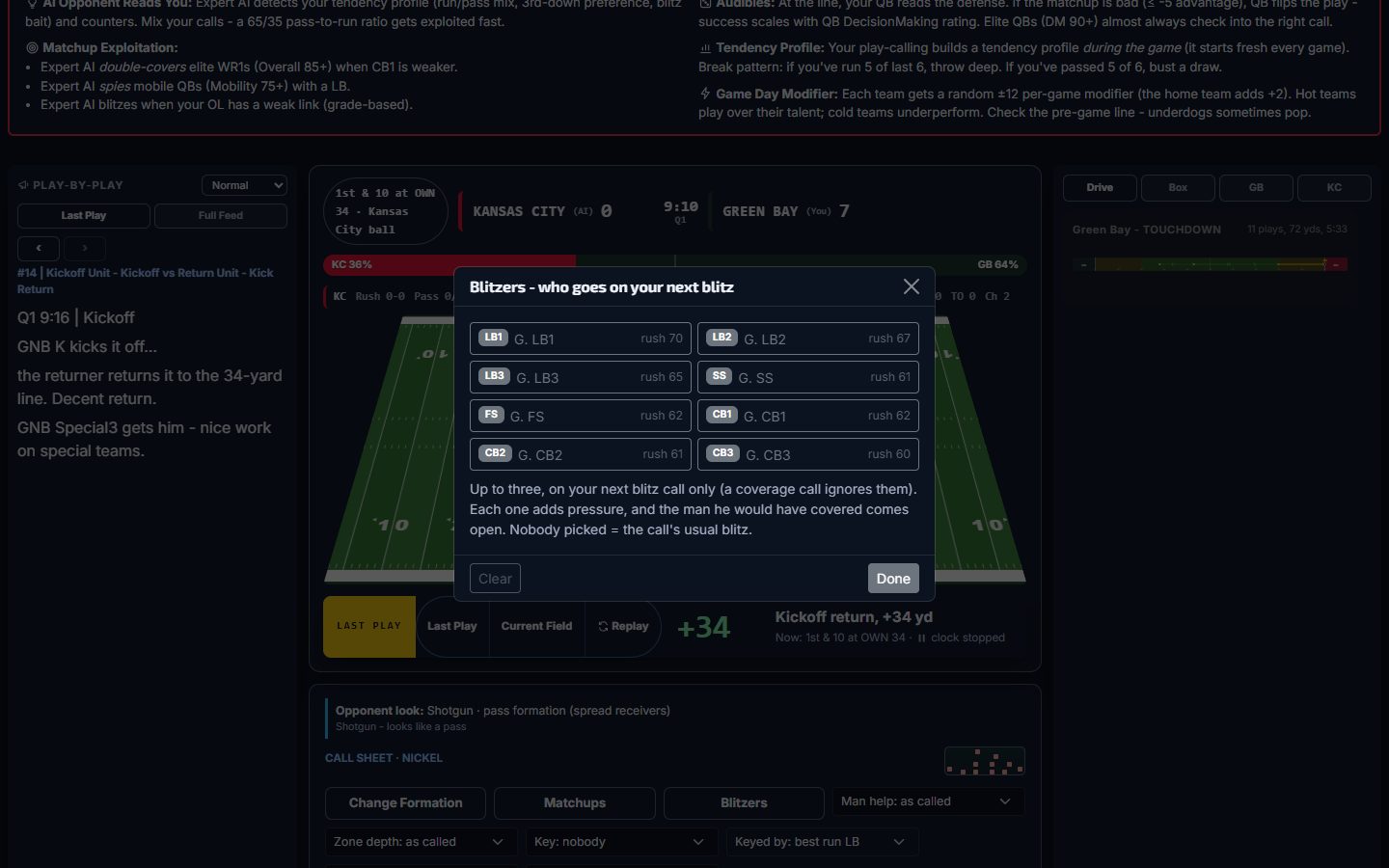
More calls on defense
- Disguise: hides your coverage a little better, so the throw on that play is slightly harder.
- Dbl team (Auto, None, WR1, WR2, WR3 / Slot or TE) and Bracket (None or the same receivers) - fewer completions to that man, especially deep against a bracket.
- Ice the Kicker before a field goal.
- My Defensive Playbook: your saved calls. A saved call uses its own front and keeps your matchups and call details, but not disguise, double team or bracket.
Disguise, double team and bracket reset after every snap.
Reading the offense
- Opponent look names their formation and whether it looks like a run, a pass, or either. Offense Shows draws it.
- On 4th down a banner tells you when they've sent no kicking unit - they're going for it.
- With Expert computer difficulty, the DC read adds your coordinator's guess and advice, and Counter this read snaps the call that answers it - his recommendation then is that counter.
- Small tables show their runners (carries, average, longest) and their targets this game, to help you pick a key or a double team. The Scout tab shows their tendencies.
- Your call snaps as soon as you make it - unless the offense goes in motion before the snap. Then the play stops on Offense in Motion: Snap, or Check to change your call once, keeping the same front.
- The computer's offense uses protection too: on some passes its running back stays in to block, about as often as that team's backs really do. After the snap he shows BLK, and the play-by-play says he stayed in.
Field tags
In Broadcast and Advanced, tags on the field show the calls:
| Tag | Means |
|---|---|
| BLITZ | A defender who blitzed |
| BOX | A safety brought down |
| OVER / ROB | The help safety over the top / robbing the middle |
| KEY / KEYED | The defender keying / the back being keyed |
| BLK | A back or tight end kept in to block |
| BLZ, 2×, BR | Before the snap: your named blitzer, a double team, a bracket |
Special teams
- Coin toss: Receive, Defer or Kick (or Skip ceremony).
- Kickoff: Standard, Squib, Directional, Onside or Auto. When you can onside-kick follows the season's rules: in 2023 and earlier, on any kickoff; in 2024, only when you're behind in the 4th quarter; from 2025, whenever you're behind.
- Pooch: a high kick aimed at the 10, the 5 or the goal line (Pooch to picker). The coverage gets there with it, so returns are shorter, and a returner can be stopped inside the 10. Your kicker's kickoff rating decides how close it lands. The season's rules apply: from 2024 it has to come down in the landing zone - in the end zone in the air is a touchback, short of the 20 gives them the ball at the 40; in 2023 a fair catch inside the 25 comes out to the 25, and most are fair-caught; before that, one that lands in the end zone is downed for a touchback unless their return is set to Aggressive.
- Kick return: choose the returner, then Standard, Aggressive, Hands Team or Auto.
- Punt return: Safe, Aggressive, Block, Spy or Auto. When a punt will land inside your 10, you choose Field it or Let it go.
- Field-goal defense: Block, Return, Spy or Auto.
- After a touchdown: Extra Point or Two-Point, each with its chance.
Clock, timeouts, penalties and challenges
- Each team has 3 timeouts a half (2 in overtime). Overtime is 10 minutes, 15 in the playoffs (and in the regular season of 2016 and earlier).
- Two-minute card (last two minutes of a half, on offense): Call Timeout, Spike (only while the clock runs; costs a down), Kneel, Auto-timeout after this play, and Kick FG Now. Kneel works in overtime, the last two minutes of a half, or with a 4th-quarter lead. Take Safety appears at your own 5 or closer.
- Spike also sits beside the timeout button at the top of every view whenever you have the ball. It's greyed out when the clock is already stopped or on 4th down.
- Two-minute drill (the last two minutes of the 2nd quarter, or of the 4th when you aren't ahead): the coordinator's call, and the computer's offense, works the sideline from the shotgun. It throws over the middle only with 2 or 3 timeouts left, goes deep only when desperate, and keeps the last timeout for a field goal until it's in range.
- The clock stops after an incompletion, a spike, a score, a penalty, a change of possession or a timeout. In the last two minutes of a half (and the 4th quarter's last five) it also stops when the ball carrier goes out of bounds. A first down doesn't stop it.
- Penalties: the Flag on the Play panel shows what Accept and Decline each lead to, and marks the better one. A foul before the snap can't be declined (no play ran). When both teams foul on the same play, the panel reads Offsetting Penalties: nothing is walked off, the play doesn't count (even a touchdown), and the down is replayed - press Continue.
- Challenges: when a close call goes against you, Challenge or Let It Stand, with the chance it's overturned. Two a game, and a third if both win. A lost challenge also costs a timeout.
Keyboard
- Space or Enter: use the coordinator's call; at the pre-snap read, Snap; on 4th down, the highlighted choice.
- 1-9: pick that numbered formation or play (runs are numbered first, then passes).
- A: Auto.
- Keys don't work in the Beginner panels or while you're typing in a box.
Saving and resuming
- The game saves after every play. Save and Quit returns you to the Football hub (league games return to the league).
- Resume a game on the Football hub opens your saved games, each with Resume and Cancel game. The setup page also shows Saved Game Found with Resume Game or Discard.
- A game saved before an engine update may not resume; the notice says so, and you can discard it and start again.
Season Replay and Dynasty Replay (Football subscription)
- Create: League Name, Season Year, computer difficulty and your team, then Start Season. League games are played at Expert.
- Dynasty Replay carries on into later seasons and adds a Roster policy: Replay (real rosters) or Alternate History, with trades, cuts, free agents, waivers and how injuries work (Off, In-game only, Multi-game).
- League dashboard: Play Game, Sim Remaining & Advance, and Teams, Draft, Schedule, Standings, Stats, Trades, Injuries, Scouting, Playoffs, Awards, Recap and Offseason.
- Sim several weeks: beside Sim Remaining & Advance on the league dashboard the commissioner sets Weeks (up to 30); the button becomes Sim N Weeks and advances that many weeks in a row, each exactly as one advance would. It stops early when a week leaves games for owners who are playing them, when the regular season ends, or when the commissioner cancels it (the weeks already done stay done). Anyone else who can advance the league does it one week at a time.
- Week-Accurate Replay (the default Roster Mode): rosters follow the real team week to week, so a player who really missed a week misses it in the replay too. A team dresses the players its real roster had active that week, plus a real inactive player in the rare week one is needed to field a position (for example a fifth receiver) - even in the rare week a real team listed fewer than 47. A player still on the real club's list stays on the club; only a real move (a release, a retirement, a trade) takes him off. A player hurt badly enough to leave a replay game is out for the rest of that game, but the injury does not carry into later weeks - the real roster decides who plays next.
- With Opening Snapshot, Fixed Snapshot or Alternate History, injuries carry over between league games unless the league's injury setting says otherwise. So do injuries in every other league. An injured player misses as many weeks as his injury lists - a two-week injury keeps him out of his club's next two weeks - and while he is out he is off the lineup and the kick and return units. Any player on the field can get hurt on a snap. In these leagues about one player per club in each game picks up an injury that costs him at least one game; about as many more are hurt without missing a game - most walk it off, some sit out the rest of that game - and a few injuries end a player's season.
- Injuries (League Settings, set by the commissioner): Long-term (the default) works as described above. Game day only: players get hurt as often, but a hurt player misses only the rest of that game and is back for the next one - nothing goes on the injury list. Off: nobody gets hurt. Switching a league away from Long-term puts the players already on its injury list back in the lineup.
- Overuse (League Settings, set by the commissioner) keeps any club - yours or a computer's - from riding a player harder than a real team would. Each player's snaps per game are measured against the larger of what he really played that season and a normal starter's load at his position, so a backup filling in for a hurt starter is fine. Tire, then rest (the default): a player run past that pace loses some of his ratings, and further past it he sits out a game or two to recover. Lockout: once he is a quarter of a season's snaps ahead of his real pace to date (the threshold, 1.25 unless the commissioner changes it), he sits until his real season catches up. None: no limit. A rested or locked-out player still dresses and comes in only if his club has nobody else at his position. Overuse never ends a player's season by itself. In a Season Replay with week-by-week rosters the real weekly snaps already decide who plays, so Tire, then rest does nothing there.
- When a league game - simmed or one you play - finds a club with no healthy player left for a starting spot, a healthy player from a related position fills it instead of a stand-in: an end plays tackle (or a tackle end), a linebacker plays on the line, a lineman or a box safety plays linebacker, a corner plays safety (or a safety corner), a back or a tight end lines up wide, a spare lineman moves along the line, and the kicker punts (or the punter kicks). In a simmed game, if nobody on the game-day roster can play the spot, the club calls up a player from its own practice squad for that game - never a free agent - and the call-up is listed on the league's Transactions page. Only when nobody healthy can play the spot at all - every quarterback hurt and none on the practice squad, say - does an injured player play hurt. (A Week-Accurate Replay keeps its real game-day roster, so it makes no call-ups.)
Redraft leagues (Football subscription)
- 2-32 players - invite friends, or let the computer fill the teams.
- How a league runs: (1) the commissioner creates the league; (2) players join - every team other than the commissioner's starts as an Open Team, a player claims one and renames it on the Organization page (city, nickname and a 2-4 character abbreviation); (3) when the league is full, the commissioner presses Lock league on the Organization page (or Lock Teams in the draft's Draft setup card) - joining closes, team names and divisions are set, and any Open Team still without an owner becomes a computer team with a generated name (before locking, Make AI turns one Open Team into a computer team; Unlock reopens the league until the draft order is generated); (4) the draft - the commissioner can create it and open its room for every owner before the lock, then generates the order and begins it (see The draft below); (5) Create Schedule in the League Office builds the season, and owners set their lineups; (6) the commissioner opens each week with Open Week and a play-by deadline (in the league's time zone); (7) owners play their games until the deadline, and Sim Remaining & Advance then plays any game left unplayed and moves to the next week, which starts closed until the commissioner opens it.
- Who plays a game: the home team's owner plays it, alone (Play Game) or head-to-head against the visiting owner (Play H2H). The visiting owner can play it alone only when the home team is a computer team, or when the home owner presses Let them play solo for that game (Take back solo undoes it). A game nobody plays by the deadline is simulated when the week is advanced.
- Set the teams, conferences and divisions, games per team, Dynasty or One-Off, draft order, and the playoff teams, seeding and rounds. List the league publicly if you like, then Create League. A public league is listed under Browse public on the leagues page and needs no invite code: Join on the list, or Join this league on its home page, then pick a team. A private league is not listed - friends join it with its invite code, which only the league's members can see on the league page. Every league on the leagues page carries a PUBLIC or PRIVATE badge (SPECTATOR: anyone can watch, but it is not listed and needs a code). You can also Import a League. The commissioner can also invite someone directly: Recruit Owners on the league page → Invite a player by ID (each player's ID is on their Profile page). The invite goes to that player's inbox and lets them pick a team and join without the code - even a private league - for 30 days, while the league is still taking owners.
- The draft: five steps, in the Draft setup card on the league's Draft page, in the draft lobby and in the draft room (the commissioner presses them; everyone sees where they stand). (1) Create Draft: the commissioner chooses the rounds - the league doesn't have to be locked, and there is no order yet; nothing is picked and no clock runs. (2) Open Draft Room: every owner can come in (they get an inbox message, and the league hub's banner says the room is open) to study the board, build My Queue and set Auto-Pick or Auto-Pass, while Open Teams are still being claimed. Until then only the commissioner sees the room. (3) Lock Teams (the same as Lock league on the Organization page). (4) Generate Draft Order: by Random draw, Join order or Last season's standings (worst first) - offered first once the league has played a season; snake rounds. Re-generate Order draws again, the arrows beside each team move it up or down, and Clear Order removes the order (needed before Unlock Teams). (5) Begin Draft puts the first pick on the clock, and computer teams and owners with Auto-Pick on pick as their turns come. Until Begin Draft nobody - person or computer - can pick. A team that changes hands before then (its owner leaves, or an Open Team becomes a computer team) starts with an empty queue and Auto-Pick and Auto-Pass off. Until the draft begins, Discard Draft on the Draft page removes the draft, its order and every queue - teams, owners and settings stay - so the commissioner can Create Draft again. During the draft the commissioner can pause it on Draft Admin; Resume Draft (beside PAUSED in the draft room) restarts the clock, and the team on the clock has the time it had left. Auto-Complete lets the computer make every remaining pick and closes the draft. When every pick has been made or skipped, the commissioner gets a message; the draft stays open so skipped picks can be made up, until the commissioner presses Close Draft in the draft room (or Finalize Draft on the Draft page). Then Create Schedule in the League Office begins the season: it builds the schedule and sets Week 1, which stays closed until the commissioner opens it. In a league that keeps its rosters from season to season, every club first needs the league's roster size and the league's position minimums (see Position minimums below; the standard is 2 QB, 2 RB, 5 WR, 2 TE, 7 OL, 6 DL, 5 LB, 4 CB, 4 S, a kicker, a punter and a long snapper): a computer club that is short signs the best available free agent at that position when Create Schedule is pressed (releasing its lowest-rated player from a group above its minimum), and a club someone runs gets a warning in the League Office to fix its own roster first. When the draft closes, the draft room lists the next steps, the league hub's banner points to the next one (close the draft, then create the schedule, then set your lineup), the commissioner gets an inbox message with a link to the League Office, and every owner is told to set their starting lineup on their roster page (Starting Lineup tab, which opens once the schedule is created; any spot left on auto plays the best available player).
- Roster requirements (commissioner: League Settings, the Roster requirements card; it can be changed at any time; not in a real-season replay league). Four rules say what every team must carry:
- A starter and a backup at every position. Always on. Every starting position outside kicker, punter and long snapper - QB, two RB, four WR, two TE, LT, LG, C, RG, RT, two DE, two DT, two OLB, two ILB, three CB, FS and SS - needs its own starter and one more player rated there. A player starts at one spot only; one backup can cover several positions he is rated at (a second left tackle backs up right tackle too). A nose tackle counts at DT, a middle linebacker at ILB and a fullback at RB.
- Position minimums: the number of players at each position group - quarterbacks, running backs (a fullback counts), wide receivers, tight ends, offensive linemen, defensive linemen (a nose tackle counts), linebackers, cornerbacks, safeties, a kicker, a punter and a long snapper. The standard is 2, 2, 5, 2, 7, 6, 5, 4, 4, 1, 1 and 1 - 40 players. The commissioner can raise a group up to the number of roster spots the draft has for it (3 QB, 4 RB, 6 WR, 3 TE, 10 OL, 7 DL, 6 LB, 5 CB) or lower it (down to 1 QB, 2 RB, 3 WR, 1 TE, 5 OL, 4 DL, 3 LB, 3 CB, 2 S); kickers, punters and long snappers stay at one. The total has to fit the roster size and, in a league that keeps its rosters from season to season, the number of players each team keeps before the draft.
- Games per starting spot: the games a team's players at a position must add up to, from the season the players come from. The standard is 16; set it to the length of your season (up to 20), or to 0 for no games requirement. With 18, a team needs 18 games at quarterback and 36 at a position with two starters. Computer teams draft to the league's number.
- Kick returners and Punt returners: how many players who returned a kickoff, and how many who returned a punt, in the draft's season a team must carry (0 to 4 each; the standard is 1 and 1). The draft room shows every team what it still needs under each rule. Computer teams keep to the position minimums when they cut and sign players, and Standard Requirements puts every number back.
- No made-up players. In a league that plays from its own rosters, a game is never played with a placeholder. When a starting spot is open the game moves one of the team's own players over from a related position; if nobody on the roster can play there, a computer team signs the best available free agent at that position (releasing its lowest-rated spare player when its roster is full) and the game goes on; for a team someone runs, that game - and the week's sim - stops and names the team and the positions, and nothing is recorded until its owner signs or trades for players there. Before a season starts (Create Schedule), a computer team without a starter and a backup at every position signs the best available free agents at those positions (releasing its lowest-rated spare player when its roster is full); a team someone runs stops the start until its owner fixes the roster.
- In the draft room, pick from the board when you're on the clock, or line players up in My Queue. Above the board, Offense / Defense & ST switches sides, right beside the position filters: the groups (OL, DL, LB, S) and each spot in them (LT, LG, C, RG, RT; DE, DT; OLB, ILB; FS, SS), plus FB for the fullbacks and H-backs (RB shows them too). The KR and PR columns show the kickoffs and punts a player returned in the draft's season (blank for a player who returned none). With a position filter on, the board shows only the rating columns that position has; All shows every column. Spd (speed) is rated against players at the same position, so in All a tight end's 80 is not a receiver's 80. It comes from the player's 40-yard dash time, not from his season's stats, so it stays the same from season to season except for a slow decline with age (a season with too little playing time to rate shows the position's minimum, as his other ratings do). A player with no 40 time on record is rated from his size instead, which keeps him close to his position's average. His card shows his 40 time, or says he has none. Your scouting department's report on a player (its grade, combine and pro day) shows when you hover over his name. Click a player's name - on the board, in Best available, My Roster, My Queue, Picks, Picks Made, Current Rosters or the Falling panel - to open his card: his Overall, the ratings for his position and his Durability, on the same scale as the board, and his real season lines for the draft's season and the season before (whatever he did: passing, rushing, receiving, defense, kicking, punting, returns) - his real-world stats, not this league's. Esc, × or a click outside the card closes it; on a phone it fills the screen. Opening a card never drafts or queues anyone. If a pick is refused (the player was just taken, or the clock moved on), the room says why; a pick that went through never shows an error. Computer-managed teams make their own picks the moment they come on the clock (one after another until a person is up), whether or not anyone has the draft room open. The draft room's side panel has tabs: My Roster (your picks by roster spot - or any other team's, chosen from the list at its top - a fullback fills a running-back spot, a nose tackle a DT spot and a middle linebacker an ILB spot: your Starters first, then the Backups, and the open starting spots are listed as your starting holes. The starters follow the offense personnel you pick - Flex (QB, RB, two WR, TE, a FLEX that is your best other RB, WR or TE, and the line; the default), 11, 12, 13, 21 or 22 - and the defensive front - 4-3 (the default), 3-4, Nickel or Dime - then K, P and LS; your choice is kept in your browser. All, Offense, Defense or ST narrows the list, and a player eligible at another spot shows that spot as a button - press it to list him there, ↺ to move him back; the moves are kept in your browser for that draft. Three lines say what the team still needs under the league's roster requirements, or that each is met: Starter and backup, Position minimums and Returners. Still short lists the positions where the team has too few games, as on Coverage), Queue (its Draft button works when you're on the clock or have a skipped pick to make up), Coverage (the games your players played in the draft's season, counted at each player's position, against the league's games for every starting spot - 16 unless the commissioner set another number: QB 16, RB 32, WR 64, TE 32, each line spot 16, DE, DT, OLB and ILB 32 each, CB 48, FS and SS 16 each, K, P and LS 16. A red bar is short - too few games there to field a full season - and the list at its top shows any team's. Once three quarters of the draft's picks are made, the room also tells you which positions are still short. Below the games are the league's roster requirements, a row for every position: Starter and backup, Position minimums and Returners), Trades (with the number of open offers), Teams (the commissioner's list of every team, by city, with its offense, defense and special-teams picks; a checked team is drafted by a person - the computer never picks for it and Sim stops at its picks), Intel, Picks (the whole draft, newest first, one line a pick - the team's city, the player and his position - with Team and Position filters) and Chat. The team lists in the side panel are in order of city.
- Computer-managed teams draft for the roster they already have: keepers and players carried over from last season count toward their needs. Computer teams take their kicker, punter and long snapper with their last picks: in a full 53-round draft the kicker with the third-to-last pick (the draft's three best kickers can go up to two picks sooner), the punter with the second-to-last and the long snapper with the last; in a shorter draft they take them only once their starting lineup is full, otherwise they skip them and sign them in free agency. They take a fullback late, after their starters.
- The board's DV (draft value) is the value the computer teams draft on: how far a player is above the replacement level at his position, recalculated after every pick. Ratings describe the draft season only (Speed also uses his 40-yard dash time); DV values a player for the long run, the way you'd build a franchise: the draft season together with his three seasons before it (a proven player's track record counts nearly as much as the latest season, and a season cut short by injury counts for the games he played, not as a verdict - though a player who missed much of the draft season is valued a little below the same player healthy, so he slides a round or two), his QSE Elite Bowl and QSE Elite selections and award votes in those seasons, where a young player was picked in his real draft, and his age. A season better than his past is never marked down for it. Players are graded for their role: a linebacker who rushes off the edge is listed as an OLB and graded as a pass rusher, a corner on his coverage, a safety on his better role (deep cover or box/robber), and a running back's workload counts as well as his skills. A young quarterback taken in the first round of one of the last four real drafts carries extra value for that pedigree. Any other young player picked near the top of his real draft carries some extra value for his upside - the higher the pick, the more, fading out by about pick 20: all of it in his first two seasons, less in each of the next three and none after that, and none once he is older than 25 or has played well below where players picked there usually are by then. Win Later teams pay more for that upside, Win Now teams less, and computer teams disagree more about such a player. In value order the board is split into tiers - players in a tier are close in value, and a new tier starts where the value drops off.
- Draft tags: a player taken among the first 32 picks of one of the last four real drafts carries a tag beside his name on the board, such as #3 '23 (the pick and the draft year; hover it for the details). The tag is highlighted when the computer teams pay extra for his upside.
- FIT (beside DV) is what the player is worth to your roster as it stands: the same as DV while he would fill one of your open starting spots, a share of it when he would only back up a starter you already have. Q is his place in your queue (1 = next up).
- ADP is where a player went on average in the computer's mock drafts of your draft. A player still on the board well past his ADP is marked Falling and listed in the Falling panel (on the Intel tab), where a star adds him to your queue.
- Computer teams look ahead: they estimate who will still be there at their next pick (so a position whose best players are going fast moves up their board, without one team simply copying the last few picks), and each has a personality - Balanced, Win Now, Win Later, Offense First or Defense First. Win Now values a player as he is today, with no discount for age, so a highly rated veteran who starts to slide is the kind of player it picks up; Win Later pays most for youth. Offense First and Defense First lean only slightly toward their side of the ball, and every computer team has a starting quarterback by the end of round 8 (a team without one takes one with its round-8 pick at the latest; a quarterback it carried over or kept counts). A computer team values a player who would only be a backup on its roster at a fraction of a starter. A backup quarterback is worth the least, since only one plays, but a backup as good as a starter keeps most of his value, so a quality quarterback who slides gets picked up. A computer team drafts at most one player more than a full position group (three quarterbacks at most) unless it still needs the playing time there (see below), values that extra player well below one who would fill an open backup spot (so it fills its open depth first). It starts only a natural player at each starting spot - a left tackle at left tackle, a center at center, a strong safety at strong safety, an edge linebacker at OLB, and so on - and uses a tackle at the other tackle spot, a guard or center elsewhere inside, a safety at the other safety spot, or an end or edge linebacker at the other edge spot only as a backup. In a draft that ends with a roster of 40 or more (carried players included), computer teams also draft for playing time: each wants at least 16 games from last season at every starting spot, counted at a player's own position (32 at running back and tight end, 64 at wide receiver, 48 at cornerback, 32 at each defensive line and linebacker position, 16 at quarterback, each line spot, each safety spot, kicker, punter and long snapper). They take stars and upside first; from the fourth round on, a team behind pace at a spot - most of all one the league is running short of - leans toward players who played there, and in its last picks it drafts only players who close a gap. Its kicker, punter and long snapper are ones who played 16 games whenever one is left. AI Draft Why shows how the latest computer pick was scored, and says when a young high pick's pedigree counted - for example Young franchise QB: 1st overall, 2024 or Young high pick: 4th overall, 2024.
- Computer level: on the draft's Settings page (from the draft room) the commissioner sets how well the computer drafts for the whole league: Expert (the default) values players over replacement, looks ahead to its next pick and rarely misjudges a player; Veteran looks a little ahead and misjudges more often; Rookie drafts on raw talent and need. The same page sets each team's personality - it also shapes the computer's picks for an owner with Auto-Pick on.
- Live or slow draft: the same page sets the draft clock, in minutes. A Live draft is for everyone drafting together: every team gets 2 minutes a pick, with no time bank. A Slow draft gives each pick hours (8 hours when you switch to it, up to 24), so owners draft on their own time over several days, and each team also has a time bank of at least 1,000 minutes (up to 7 days): once its pick clock runs out, every minute it stays on the clock uses a minute of its bank. The draft room shows the time left, such as Time remaining on clock: 5h 32m, and in a slow draft the team's bank. In the last 20 seconds the clock flashes red, and the team on the clock hears a short warning (the room's Alerts button turns the sound off). Auto-skip (on for a new draft) decides what happens when a team's clock (and, in a slow draft, its bank) runs out. The draft room shows a chip for every owned team under the clock, lit green while its owner has the room open; hover it for the team, its owner and whether they are online or offline. Optional quiet hours, in the league's time zone, hold a slow draft's expired picks overnight until they end.
- Mock Draft (in the draft room) practices from where the real draft stands, with the computer drafting the other teams the way it will for real. Run simulates 10, 25 or 50 drafts and lists each player's ADP and earliest and latest pick.
- Trades with computer teams: with trading on, an offer to a computer team is answered at once - it accepts a fair deal, sends back a counter-offer when an offer of picks only is close, or declines. Picks are valued by a pick-value chart and the team's personality; a player already drafted is valued by what he is worth now - where he would go if the whole pool were drafted again, and less to a team he would only back up for - not by the pick he was taken with. A computer team turns down any deal that would open a hole in its starting lineup. Computer teams sometimes trade up with each other when a player they need is about to go, and sometimes offer you a trade-up for your pick when you are on the clock: the offer shows as a banner at the top of the draft room (with the alert chime when Alerts is on), under Trades, and in your league inbox; accept or decline it there, or send an offer of your own. Every offer - open, accepted, declined or expired - stays listed under Trades, during the draft and after it. Each offer is for one player who would start for the computer team and who it expects to be gone before its own pick (the message names his position), and a computer team that moves up drafts that player with the pick (AI Draft Why reads Moved up to take him); computer teams trade up only in the first 20 rounds, and a team drafting on Auto-Pick gets no offers. A computer team has at most one offer open at a time; you get at most three computer offers in a draft, at least four rounds apart; computer teams make only a few trade-ups with each other in a draft (one for every six teams, at least two); and an offer lapses when the pick it asks for is made or the round ends - it leaves your screen then, and a lapsed offer can no longer be accepted or declined. In a draft where every team fills the same roster (nobody carries a player in - an inaugural draft or a full redraft), every trade is even: the same number of picks or players on each side (1 for 1, 2 for 2). A computer team moving up then gives its pick and a better later pick for your pick and your latest one, and a counter-offer asks you to upgrade one of your picks instead of adding one. Trading during the draft is its own setting on the draft's Settings page, apart from trading during the season (until the commissioner sets it, it follows the league's trading switch): with it on, the commissioner also chooses whether computer teams send offers to people (move-up offers and counter-offers), accept offers (off: people trade only with each other) and trade with each other.
- Draft Grades: once the commissioner closes the draft, the draft room and Replay show each team's grade - the value it drafted against what the mock drafts expected at its picks, plus how many starting spots it filled - and the biggest steals and reaches against ADP.
- Auto-Pick (at the top of My Queue): your picks are made for you as soon as you're on the clock - the top of your queue, or the computer's choice when your queue is empty.
- With Auto-Pick off, nothing is picked for you early: My Queue only lines players up, and you press Draft when you're on the clock. Your pick clock runs, then (in a slow draft) your time bank. When the time runs out in a live draft, the top-ranked player still on the board in your queue is drafted; with nobody usable in your queue, the computer drafts for your roster's needs and the best player available. In a slow draft your pick is skipped (your queue is not used) and the next team goes on the clock; you can make it up later from Skipped picks. If the commissioner turns Auto-skip off, the draft waits for you instead, or for the commissioner to pick or skip for you. With Auto-Pick on, your queue (or the computer, when it is empty) picks for you as soon as you're on the clock.
- Your next pick: under On the Clock the room shows when you pick next - Your next pick: #311 (R13.23) · 7 picks away and the picks after it - or You're on the clock, and the Your Pick bar reads Waiting - you pick in 7. Two picks before yours the room chimes (with the room in a background tab the title flashes and, if you allowed notifications, a notification says you're up soon); Alerts turns it off with the other alerts.
- When you pick: the Draft button reads Drafting… until the pick is in, then a green line names the player and the pick number (You drafted ... - pick #314). A pick made for your team - your clock ran out, Auto-Pick, or the commissioner - shows the same line in blue. The first time in a draft you pick a player who isn't in your queue, while your queue still has someone available, the room asks first and names the top of your queue; after that it doesn't ask again in that draft (in this browser). A click that arrives after the clock has moved on tells you your last pick is in and who is on the clock.
- My Roster's badge counts the picks you have made against your picks in the draft (34 / 40 picks); hover it for how many roster spots they fill. Picks beyond the roster spots are listed under Bench / extra.
- On a phone (or any window narrower than 1,100 pixels) a bar at the bottom of the room switches between Board, Roster, Queue, Picks and More (the other tabs), one view at a time; the clock and your pick line stay at the top of both.
- Before the draft begins the room counts the players in your queue, and in a live draft suggests queueing at least 15: when your clock runs out, the top of your queue is drafted. On the Settings page, a live draft of 25 rounds or more reminds the commissioner that owners need their queues ready - or that a slow draft gives each pick hours.
- The top of the room stays in view: on a wide screen, everything from League HQ down to the Your Pick bar stays pinned at the top while you scroll the page.
- Getting back to the league: League HQ (top left of the room) always goes to the league office. Before the draft begins and after it is over, the room also shows the league's own menu across the top.
- Ticker: beside On the Clock, the ten best players available, each with his position and OVR, stay on top until one of them is drafted, and under them a ticker loops the latest 10 picks. The ticker takes in new picks each time it comes round, not on every pick. Hover it to pause it.
- Private chat: double-click an owner's chip (or select it and press Enter) to open a private conversation with that owner, or choose them from Message an owner privately on the Chat tab. Chat has a Room thread that everyone sees and one thread for each owner you talk to privately; only the two of you see a private thread. An owner who does not have the draft room open gets an inbox message (the bell) that says who wrote - never what - and finds the conversation marked unread when they next open the room; it stays unread, also after a reload, until they open it. The Chat tab carries a badge with the number of messages in the Room thread (private messages are not counted; no badge while the Room thread is empty), and a second, highlighted badge with the number of private conversations that have unread messages. A private message from another owner chimes unless that conversation is open in front of you; with the room in a background tab the tab title flashes and, if you allowed notifications, a notification names the sender. Alerts turns these off together with the clock and trade-offer alerts.
- Missing starters: late in the draft the room warns you in red while you still have open starting spots - once you have no more than three picks to spare beyond them - and in yellow when every starter is in but a position has no backup with only a few picks left. A starting spot counts as filled only by a player at that position (a second right tackle doesn't fill left tackle, a guard doesn't fill center, a free safety doesn't fill strong safety). When the picks you have left only cover your open starting spots (say three picks left and no kicker, punter or long snapper), the board drafts only players who fill one of them. A draft with fewer rounds than starting spots never warns or holds you to it: the rest of the roster comes from free agency.
- Trade offers you send show only Cancel Offer; the other team accepts or declines them. The Trades tab lists only the offers your own team is part of - sent or received - and its number counts those; only the team an offer is made to can accept or decline it. That holds for the commissioner too: in draft trades the commissioner is an owner like any other. An open offer is withdrawn by itself as soon as a pick in it is made (or skipped): it shows as Withdrawn and nothing changes hands - send a new offer for the player if you still want him. An offer for a player who was already drafted when it was sent stays open.
- A trade offer made to you opens in the middle of the screen, away from the board's Draft buttons. It says what you get and what you give, with Accept, Decline, Counter and Later. The buttons take no click for about the first second, so a click meant for a player can't answer the offer, and Accept asks once more (Yes, trade or Back) before anything changes hands. Counter opens the offer turned around in the Trades tab for you to change and send; sending it declines the offer it answers, and closing the form leaves that offer open. Later puts the offer aside: a line above the pick bar says it is waiting, and Review there - or Review offer on the Trades tab - brings it back.
- The commissioner can make the pick for the team on the clock (the board's button reads For and that team); the room asks to confirm it first.
- When your pick comes on the clock in a league you share with someone else, you get a message in the league inbox (the bell); in a slow draft it says how long your pick clock is.
- Auto-Pass (next to Auto-Pick): you're done drafting. Your picks are skipped when you come on the clock and nobody else takes them. While the draft is open you can make up any skipped pick from Skipped picks; picks not made up stay empty when the commissioner closes the draft.
- Each pick signs a rookie contract when it fits under the salary cap. After the draft, Replay in the draft room plays it back pick by pick.
- Pick History (History in the draft room, Pick History in the lobby) and the Team Picks tab of the draft's Reports list every pick in order - pick, round, team, player, position, and when it was made. Choose a team to see who it took and when, with a count by position. The commissioner and draft admins also see the draft's full event log there.
- Reports → Draft Board shows every round × team: each column is the team whose slot it was. A traded pick shows in its slot with to and the team that made it, a skipped pick reads Skipped - to be made up, and a pick still to come Not picked yet.
Auto-set: the computer manages an auto-set team on game day. Every game uses whatever the team has saved - its Starting Lineup, personnel packages and game-day inactive lists - and a saved player who is injured or unavailable that week is replaced by the best available player at his slot. Any slot left on auto gets the best available player that week, after injuries, trades and signings, and with no inactive list the automatic split applies. Computer teams are always auto-set. On Commissioner Tools → Teams, the Auto-set Teams card lists every team: the commissioner switches on any team someone runs (their own too), or presses Auto-set all teams now. So in a league where you run one team, switch the others to the computer and only your own team needs setting. An owner can switch their own team on with Turn Auto-set on at the top of their roster page and back off with Set it myself. Switching Auto-set on or off never deletes anything the team has saved, and the Starting Lineup, Formations and Game-Day Inactives tabs stay, so you can keep changing them while it is on.
Taking a break: an owner who will be away for a while (or the commissioner, on the owner's behalf) clicks Take a break… on the team's Roster page and picks Until I come back or a return date. While the team is away the computer sets game day with Auto-set (keeping the team's saved lineups - it only covers injured, tired or sent-down players), the draft room auto-picks for the team, and trade offers to it don't expire; the league is told, and the team's page and the Trade Center show an Away badge to everyone. The break ends on its date, or early with I'm back (the commissioner: End the break): the owner gets full control back with everything as it was before - Auto-set on or off as it was, the draft settings restored - and any offers that waited get a fresh week to answer.
League stats and records
- Stats: player leaders by category (Passing, Rushing, Receiving, Defense, Kicking, Punting, Returns, Blocked Kicks) and a Team tab. Click a column heading to sort by it, click it again to reverse; hold Shift and click another heading to add it as the next sort. Players with equal numbers share a rank, shown as T-3.
- Rate stats rank only players who have played enough of their team's games. Per game the team has played: 14 pass attempts (completion %, interceptions, yards per attempt, ANY/A, passer rating), 6.25 carries (yards per carry), 1.875 catches (yards per catch), 1 field-goal attempt (FG %), 2.5 punts (punt average) and 1.25 returns (return averages). The note under each table gives the current number. Turn on Show non-qualifiers to list the others below, without a rank.
- Totals or Per game, Columns to show or hide columns, and Export CSV to download every row of the current view as a spreadsheet file. Long lists show 50 players a page. The page address keeps your tab, sort and settings, so you can bookmark or share the view.
- Filters above the table: Season (any season with stats, or Career (all seasons)), Team, Position (QB, RB / FB, WR, TE, offensive line, defensive line, linebacker, defensive back, kicker, punter) and Rate stats rank: Qualified players (the rule above), Minimum (type the attempts, carries, catches, field-goal attempts, punts or returns you want) or All players. The page address keeps them too.
- Career (all seasons) gives one line per player for every regular-season league game, under the team he finished with. A career qualifies at the same rate per team game, counted over the seasons he played. The Team tab is by season only.
- The Team tab sorts by any column: scoring, offense, defense, turnovers, sacks allowed and time of possession, with more under Columns (plays, completions, attempts, completion %, carries, yards per carry, first downs, fourth-down rate, red-zone trips, and yards per play, passing, rushing, first downs and third downs allowed, sack yards, penalties and penalty yards). The small number beside points, yards, yards per play, passing, rushing, third-down and red-zone rates, sacks and turnover margin is the team's league rank in it (1 = best; T- = tied).
- Compare players (on Stats & Leaders and every player page) puts two players side by side: that season, that season's playoffs and their league careers, with the better number in bold. Pick the season and type each player's name.
- Player pages: a season picker; the Season Totals table adds a League career row once a player has more than one league season, and shows fumbles lost (Lost), punts blocked (PBlk) and special-teams tackles and blocked kicks (ST Tkl, Blk) for league lines (real lines show - there: there is no real source for them). Splits show the regular season home and away, in wins and losses, by opponent and by week. The Game Log lists every game of the season, newest first (playoff rounds on top), each linked to its box score.
- Records: the league's single-game, single-season and career records, earned from completed league games, plus the Hall of Fame and career leaders.
- League History (the History menu, the same page in every sport): the champions with each final's runner-up; season by season, the games played, the best regular-season record, the champion and runner-up and the award winners; all-time franchise records (seasons, won-lost record, win %, points for and against, playoff appearances and titles); and the league record book (single-game, single-season and career), with links to Records, Hall of Fame and Trophy Room.
- Award and Hall of Fame votes (commissioner: League Settings, the Awards and Hall of Fame card): a league can vote on its season awards and its Hall of Fame instead of leaving them to the computer.
- Season awards: The computer picks them (the standard) or The league votes. When the league votes, the ballot opens by itself when the regular season ends (the commissioner can also press Open the awards ballot on the Awards page). Most Valuable Player, Offensive Player of the Year and Defensive Player of the Year go on it, each with the computer's top ten. Each owner ranks three players per award: 1st place is worth 5 points, 2nd 3 and 3rd 1. Most points wins; first-place votes break a tie.
- Hall of Fame: Career thresholds (the standard: players go in automatically) or The league votes. When the league votes, a ballot opens once a season's retirements are in (by the time the next season starts), listing every retired player with at least the league's minimum seasons (10 to start); the commissioner can also open one on League ballots. Each owner names up to 10 players, and a player named on 75% of the ballots goes into the next year's class. A player named on fewer than 5% of the ballots, or already on 10 ballots, drops off for good. The commissioner sets those five numbers.
- Who votes: the owners plus one computer ballot for each computer-run team (the standard), or owners only. A computer team ranks the computer's choices, each nudged a little, and names the Hall of Fame candidates who clear the career thresholds.
- Owners can change their ballot until the commissioner presses Close the vote. League ballots (from the Awards and Hall of Fame pages or the settings card) shows who has voted and, once a vote closes, the result and every team's ballot. The winners appear on the Awards, Hall of Fame and League History pages like any others. Cancel the ballot throws a vote away.
- Team history (History on a team's page): every season's record, points for and against, playoff seed and finish, plus all-time record, titles and playoff seasons; Names & owners (the team's names and owners over time), Draft (its picks, marked when the pick came by trade), Trades & moves and Awards (its award winners). A player's page has a League history card: where the player was drafted, awards, the moves that name the player and the Hall of Fame.
- Week in Review (the League menu): a page for each played week - every score with both teams' records, headlines (the biggest win, an upset by the power rankings, the closest game, teams still unbeaten), the power rankings through that week with each team's move up or down, the week's best performances, and the next week's games with both records and this season's meetings. Pick any played week; the latest shows first.
- Reports (the League menu): Roster sizes (active, reserve, injured and total for each team against the league's roster limit, with any team over it named), Payroll (each team's contracts this season), All rosters (every rostered player by team with position counts) and Moves (this season's releases and the season's moves by type).
- League email (Email settings on the league inbox opens League emails): "Your pick is on the clock", "A trade offer to your team" and "A trade needs your approval" (commissioner and roster admins) also come by email, right away, in a league with two or more people, and commissioner announcements come to everyone. Turn any of them off there, or turn on any other league message (trade news, chat messages, votes opening or closing, a new week, a game waiting for you). Every email has a link that stops that kind, and the message is still in your inbox. The weekly league newsletter (power rankings, headlines and the next week's featured games) is opt-in per league on the same page. Email goes only to a verified address. The commissioner sends an Announcement to the league from the league inbox: it goes to every member's inbox and by email.
- Co-owners, league admins and draft proxies:
- Co-owner: a team's owner (or the commissioner) adds a co-owner on the team's Branding page by player ID; the co-owner joins the league if they weren't in it. A co-owner does everything the owner does for the team - lineups, roster moves, trades, draft picks, free agents, votes, chat and the team's games - and gets the team's messages. Only the owner can leave or release the team or change the co-owner; the co-owner can Step down. If the owner leaves the league, the co-owner takes the team over. A co-owner can't also run another team in the league.
- League admins (commissioner: League Settings, the League admins card): hand a member a job. Draft admin runs the draft (the draft admin page). Roster admin approves or vetoes trades waiting for approval on Trade approvals (never a trade one of their own teams is in) and processes waiver claims on Waivers; they get the "a trade needs approval" message too. Awards admin opens, closes and cancels award and Hall of Fame ballots. The commissioner keeps every job; admins can't change league settings.
- Draft proxy (the draft's lobby, Draft proxy): an owner who can't make the draft picks a league member to make their team's picks in that draft; the proxy is told in their inbox. The owner, the co-owner or the commissioner can change or remove it.
- League Chat (the League menu, the same page in every sport): Whole league is everyone's conversation; under it is a private conversation with each other member, and a conversation for each trade your club is in (open trades, and any trade that has messages). New messages appear as they are sent. Members post; anyone else who can view the league reads Whole league only. A trade's conversation is for its two clubs (the commissioner can read it); Discuss on a trade card in the Trade Center opens it. A private message or a line in your trade's conversation leaves one inbox notice until you read it, without quoting it. Delete your own messages with Delete; the commissioner can delete any message in Whole league or a trade conversation. Report sends a message to the site's admins. A number beside a conversation counts its unread messages.
- Polls (the League menu): the commissioner asks the league a question with 2 to 10 answers, closing it by hand or after 1, 3, 7 or 14 days, with the totals shown while voting or only once it closes. Every member votes once and can change the vote until it closes; a new poll lands in every member's inbox. Ask who's coming back asks each team whether it returns next season, one answer per team from its owner or co-owner, and Remind the rest sends the teams that haven't answered an inbox reminder. The commissioner can turn on Members can start polls too on the Polls page.
- Constitution, In Memoriam, Links & Downloads (the League and History menus): the commissioner writes the league's Constitution in Markdown (# headings, bold, italic, lists, links), or imports it from a Word (.docx), PDF, Markdown or text file - the import fills the editor for a review before Save (a PDF converts approximately, and pictures in a Word file are left out); the bylaws generated from the league's settings follow it. In Memoriam (History) is where the commissioner remembers the league's own owners and members, a tribute for each. Links & Downloads (League) holds the links the commissioner pins (https:// addresses) and the files he shares - PDF, Word, Excel, CSV, text or an image, up to 10 MB each and 50 per league - which the league's owners and members can download.
- AI Teams (the League menu): a team the computer runs can get a human owner at any time, in season or between seasons - except while one of its games is being played (a draft in progress is fine). The list is in A-Z order: find a team by name or initials, narrow it to a conference or division, or sort it. Ask for a team there (Ask for it), or press Claim beside it on the Organization page, and the commissioner approves or refuses it - you get an inbox note either way; or the commissioner invites a player by user id and the player accepts or declines (the invite arrives in the inbox, and Accept / Decline are at the top of the AI Teams page). The commissioner (or a site admin) can also add a player at once: Invite… beside the team, the player's user id, then Add now - no accept step, and the player gets an inbox note. The new owner takes the team exactly as it stands - roster, contracts (now in his name), draft picks, record and lineups - and the computer stops running it: Auto-set stays off until he turns it on. A player runs one team per league. A commissioner who doesn't run a team can take one himself at once (Run it myself), and the whole league is told who took it over. The commissioner can also remove an owner who has gone quiet (Teams people run, Remove owner, with an optional reason the owner and the league see): the team's co-owner takes it over if it has one, otherwise the computer does and the team joins the AI teams for someone else. The team's open trade offers are withdrawn, and it can't happen while one of its games is being played. In a league that is already under way, a player who looks it up by its invite code asks for a team the same way (Ask for this team) instead of joining at once, and the commissioner approves or refuses it. The commissioner sees the code on the league page all season; in a Replay league every owner does.
- League name and initials (commissioner: Settings, League Info): rename the league at any time and give it initials of 2 to 12 letters or digits (such as BFL). The initials show beside the league's name in the league menu, on the league's home page and on the leagues page; on a phone the league menu shows the initials in place of the full name. Leave them blank and the league uses the first letters of its name's words. Save Info saves both - a league always needs a name.
- Transactions (the League menu, the same page in every sport): the league's trades, signings, releases, waiver claims, practice-squad call-ups, expired contracts, real roster moves and commissioner actions, grouped by season with the newest season first and the newest move at the top. Each line has its number within the season (2025.3 is that season's third transaction) and its date, and names the club and player. A trade names everything that moved, players and picks: a pick reads as the club it first belonged to, the season and the round - ABC 2025 #2 is that club's 2025 second-round pick, whether or not that draft has been held yet (the draft room shows the exact pick while you trade). A pick that had already been made when it was traded reads as the player taken with it. Filter by type or season; each line keeps its number.
- Corrections (commissioner and roster admins: Corrections on the Transactions page): Void any of this season's transactions, choosing each time to Undo the moves (players go back to the club they left, with their contracts, and traded picks go back to their old owner) or to Mark it void only (the rosters stay as they are). The line stays on the Transactions page, struck through, with the reason. Undo works for trades, and for releases, signings, and waiver claims made from now on; a move whose player has moved again since can only be marked void. Correct text fixes a line's wording (the original is kept). Enter a trade moves players between two clubs at once, for a deal made away from the site: the league's trade rules still apply, the line says it was entered by the commissioner, and both clubs are told.
- Limits on moves (commissioner: League Settings, the Limits on moves card; all off to start): Free-agent pickups per team per season caps the free agents an owner signs (the computer's automatic fills never count). With The commissioner approves each free-agent pickup on, an owner's signing becomes a request on the league's approvals page (Trade approvals, under Pickups waiting): the player stays a free agent meanwhile, signs on approval if he is still available (otherwise the request lapses), and the owner is told either way; requests still waiting count against the limit. Waiver claims won per team per season caps the claims a team wins: a team at the limit can't place a new claim and is passed over for the next team in line. Draft pool: games played at least leaves players with fewer games in the draft's season out of the pool of a draft that hasn't begun.
- Contract-years cap (commissioner: League Settings, the Limits on moves card, Contract years per club; off unless set, commonly 130): a club's contract years are the full length of every active contract it holds - a 5-year deal counts 5 until it ends. Every roster spot needs at least a 1-year contract, so a signing also holds back one year for each other open roster spot. A free-agent signing, a waiver claim, an RFA bid or an RFA answer that would go over the cap is refused, with the most years the club can still add; a trade that would put either club over it can't be proposed or go through. Draft picks count too: a drafted player signs a 4-year rookie contract, so a pick that would put the club over is refused in the draft room with the reason (a computer club's pick that would go over stands without a contract). Computer clubs keep to the cap too: in the offseason their new deals are shortened to fit (at least a year each), and a player no length fits is released when the club can spare him. The commissioner's Edit contracts and CSV import aren't blocked, but name any club left over the cap.
- Blind bidding (commissioner: League Settings, Limits on moves, Waiver claims resolve by - Waiver priority is the standard): with Blind bidding (season budget) each team gets a budget for the season (the commissioner sets it; $100 to start). Claims are still placed from the free-agent page; each owner then sets a sealed bid on the team's claims on the Waiver Wire page ($0 is allowed, up to what the team has left), where other clubs' bids show as sealed. When claims are processed the highest bid wins, ties go to waiver priority, a bid above what its team has left is passed over, and only the winner pays. The budget resets each season.
- Edit contracts (commissioner only: Edit contracts on the Contracts page, in a league with contracts): change any active contract's years (1 to 7), salary per year, guarantee, team option and no-trade clause, or import contracts in bulk from a CSV - a header row, then one contract per row with player (id or full name), team (initials), years and salary (1500000, 1.5M or $1.5M), and optionally guaranteed, start_season, team_option and ntc (yes / no). Save a spreadsheet as CSV, then paste it or choose the file. Preview checks every row first (each player must be on that club's roster); Import brings in the rows that pass, replacing each player's active contract. Every edit and every imported contract is logged on Transactions.
- RFA auction (RFA Auction on the Contracts page, or the league's RFA Auction tile, in a league with contracts): the commissioner decides who is a restricted free agent - a player whose contract has just ended without a new deal, after at most a set number of seasons with his club, and/or one his owner has tagged (when the commissioner lets owners tag their expiring players) - sets the match window (48 hours unless changed) and opens an auction with a hard close, usually after the season advances. The auction comes before the annual draft, never alongside it: it can't open while a league draft is under way, and Begin Draft waits until every RFA player is settled. Other clubs bid contract years (1 to 7) and may add one future draft pick they own - there is no salary in a bid, and the new contract keeps the salary of his expiring one. Bids rank by years, then the pick (an earlier round beats a later one; any pick beats none); a new bid must beat the top bid, and the club it outbids is told and can bid again. A bid in a player's last 24 hours moves his close to 24 hours after that bid, so bidding on him ends only after a full day without a bid. When bidding on him closes, his club has the match window to answer: offer more years than the top bid and he stays; the same years and a 50/50 roll decides. If his club lets him go or doesn't answer in time, he signs with the top bidder, and his club receives any pick in that bid. With a contract-years cap, a club can lead the bidding on at most as many players as it has open roster spots, and its leading bids' years, plus a year held for each other open spot, must fit under the cap (the RFA page shows the club's years and open spots). A player with no bids stays a free agent. While a player is in the auction no club can sign him as an ordinary free agent, claim him on waivers or draft him. Every result is logged on Transactions.
- Roster cutdown (the Roster Cutdown page; off unless the commissioner sets it - he has it under Commish at all times, and owners find it in the Manage menu while the window is open, or while their club is still over the size after it closes): the commissioner sets a roster size and a window (when it opens and closes, UTC). Counted toward the size: every player on the club except the farm list, the practice squad and the inactive list. While the window is open an owner (or the commissioner) ticks players and cuts them - each is released, his contract ends and the move is logged on Transactions - and can undo a cut until the window closes, unless the player has signed elsewhere since. Every owner is told when the window is set; the league home page reminds an owner whose club is over the size how many to cut, and the commissioner sees every club that is over. When the window closes nobody is cut automatically: a club still over keeps its reminder. A few leagues also have a small inactive list (the commissioner sets how many per club, none by default): while the window is open, a player who didn't play in the real season can move there - he stays with the club, doesn't play and doesn't count toward the size - and back again, on the Roster Cutdown page only (the roster page can't move an inactive-list player).
- Releasing a player (Release on a team's roster page): the commissioner can release a player from any club at any time. An owner can release only between the draft and the league's first game of the season, and while a Roster cutdown window is open; the rest of the season the roster page shows no Release. To make room in season, sign a free agent with a matching release: on Free Agents, a full roster's Sign dialog asks who goes, and Sign + release signs the new player and then releases the one you picked, so the club stays at the limit. With waivers on, a full roster's claim names who goes: he is released only if the claim wins (the Waiver Wire shows it to you and the commissioner).
- Trade Block (the League menu): every club's players up for trade, with what the club is looking for and its note, for everyone in the league. Under Your block an owner writes Looking for and a Note (Save note) and puts players on the block with Add to block (Remove takes one off); the Trade Center's Trade Block tab still edits the same list. Lists sort by last name, and each player shows his position and OVR. Make an offer beside another club's player opens your Trade Center on Propose Trade with that club chosen and the player already asked for. A player who is traded or released leaves the block.
- Rating colours: every rating number, bar and badge uses one colour scale by tier: Elite 95+, All-Star 88+, Star 78+, Starter 70+, Backup 55+, Replacement 45+, and Depth below that. On player pages, hover over a rating to see its tier.
Parity: your league against the real season
- Parity (in the league menu of every football league once the season has started) compares your league's own box scores with the real season, player by player and team by team. In Season Replay and Dynasty Replay a player's real line is his real stats through the same weeks your league has played, every real team he played for combined; in other leagues it is his real season paced to the games his team has played. The page always reflects the games played so far. A player's game counts, in your league as in the real logs, when he has a line in the box score.
- Players: choose a position group, a team, a minimum number of games and a minimum of the group's main stat. Each stat shows your league's number, Exp (the real number for the same games), Δ (the difference) and z: the difference in noise bands. In a league where injuries carry over between games, Exp is the player's real per-game line times the games he played in your league, so the games he missed hurt are not counted as inaccuracy (Why still shows them). A season total over that many games naturally wanders about one band, so beyond ±2 is unusual; |z| sorts by size either way. Why splits the main stat's gap into games played, chances per game (pass attempts, carries or targets) and output per chance, and counts games missed injured in your league. Real by team (Season Replay and Dynasty Replay) is a traded player's real line with each club. Columns adds each player's whole real season.
- Teams: each team's record and points for and against, beside the real club's first games of the same number (Season Replay and Dynasty Replay; a redraft team has no real club). Diff z is how far your point differential is from the real one, in noise bands.
- Scorecard: the checks behind the letter grade (A = 90% or more of them passed): league totals against the real totals, whether the players who did the most in real life also did the most in your league (1.0 = the same order), and the share of players within ±2 bands. These are the page's own yardsticks; early in a season most checks are noisy.
- Export CSV on the players and teams tables downloads the view: your league's lines and the real ones.
- Player pages: under Season Totals (whose real rows are whole seasons), sim vs real, same games compares the player's league season with his real one through the same games, with the Why split and his real line with each club.
- Creating a league: when you pick a season, the page lists any real data that season is missing and what that changes, including any week whose real roster listed fewer than 47 active players (that week is played with the real short roster, plus a real inactive player if one is needed to field a position).
League seasons and the inbox
- A league season runs setup, the draft (redraft leagues), the regular season, the playoffs, then the offseason. When the playoffs crown a champion, the league moves to the offseason.
- Playoffs page: the bracket, one conference on the left and the other on the right, each round one step closer to the championship game in the middle (a league without conferences splits its bracket into two halves). Each game shows the seeds, the clubs, the score once it is played (the winner highlighted) and a Box link to its box score; a club with a first-round bye has its own card in the first round. A game ready to play has ▶ Play, and Sim plays the whole current round. Seeds are re-paired after every round: the best seed left plays the lowest. On a phone the bracket is listed round by round.
- Playoff home field: the better seed is at home in every playoff game except the championship game. If a club someone runs plays in the championship game, that club is at home; if both clubs are run by people, the one with the better regular-season record is (with equal records, the better seed). A championship game between two computer clubs is played at a neutral site: neither club gets home-field advantage, and the game is marked Neutral site on the bracket and in its box score. In a tournament, Your club (optional, when you set it up) counts as your club: if it reaches the final it is at home; any other final is played at a neutral site. Your club is saved with the tournament.
- The Offseason Hub (in the league menu; the commissioner also gets Manage Offseason on the league dashboard) has the recap, awards and bracket, plus free agents and contracts when the league uses them. The commissioner starts the next season there; it waits until that season's real schedule, opening rosters and ratings are available.
- The commissioner's End League ends a league for good: it does not continue to another season.
- Archive a league: done with a league - a test league, a finished season? The commissioner's Archive league (commissioner page, Season tab) puts it away. It leaves the leagues page and the other league lists for every member, nobody new can join it, and nothing runs on its own: no draft clock or computer picks, no sims or week advances, no computer trade offers. Nothing is deleted. Members find it again with Show archived on the leagues page, and its page says it is archived. The commissioner's Restore league (on that page, or on the Season tab) puts it back exactly where it was; a draft that was running gets back the time left on its pick clock.
- Clone a league: the commissioner's Clone this league (commissioner page, Season tab) makes a new league, named after this one with (clone) added, at the start of the same season: the same teams, settings, schedule and rosters as they stood before the season's first game - trades after it are undone, players signed after it are left out, players released after it come back, and nobody starts injured. The draft is finished and week 1 is ready to sim. Nothing that was played comes across: no results, box scores, standings, injuries, transactions or messages. Saved depth charts, formation lineups and game plans don't come across either, so each club starts with the computer's choices until its owner sets new ones. The commissioner keeps their own team; every other owner's team is run by the computer, and nobody else is added to the clone. The original league is not changed. Compare with this league (after cloning) and Compare with the original (on the clone's Season tab) open the two seasons side by side: points, passing and rushing yards per team game, completion percentage, yards per pass and per rush, turnovers and sacks per team game and field goal percentage, each club's record and points for and against, then players' lines in both leagues by Passing, Rushing, Receiving and Defense. Sort the players by usage or by the biggest change.
- Roster Presets (commissioner, a league that uses the stock teams: the Roster Presets tile): Add missing players puts each club's stock players who are on no roster in the league back on that club, as reserves - nothing a club has set changes, and pressing it again adds nothing. Reset to stock rosters (it asks first) rebuilds every club's roster from the stock rosters and clears every depth chart, formation lineup, reserve and injured list, trade and release this season. A league whose rosters come from its draft gets neither.
- Offline league games: a league game checked out to play offline is held for you for 7 days. If its result has not synced by then, the league plays the game as a simulation, and a result synced later is not recorded.
- Inbox: the bell on every league page shows how many unread league messages you have: a trade offer, a private message an owner sent you in the draft room while you were away, changes to the league's season, an awards or Hall of Fame vote opening or closing, a private message or a line in your trade's conversation in League Chat, and - in a league you share with at least one other person - a new week opening and a game waiting for you. Open a message to go to the page it is about; Mark all read clears the bell. The bell in the top bar of every page counts unread messages from all your leagues and opens Inbox, which lists them all - league invites included. Messages are kept for 90 days.
League calendar, time zones and My Games
- Future draft picks in trades (redraft and dynasty leagues): a season trade can include future draft picks as well as players, for as many seasons ahead as the commissioner allows under Commissioner → Trade rules (1 to 5; 3 unless changed). The same rules set whether computer teams deal in picks: Answer and propose pick trades (the default), Answer offers with picks, never propose them, or No pick trades with computer teams (a computer team turns down any offer with a pick in it). With the default, from week 4 a computer team with a .450 record or worse may offer a team at .550 or better its best player (never its starting quarterback) for one of that team's future picks of about the same value to that team - at most two such offers a week in the league, and none from a team that already has an offer open; it reaches you like any offer. A first-round pick next season is worth about as much as a starting wide receiver rated in the low 50s; later rounds and later seasons are worth less. A traded pick goes to its new team when that season's draft is set up.
- League calendar: the league's schedule page lists the season's dated events: opening day, the trade deadline, the all-star break, the end of the regular season and each playoff round (plus the draft, waivers and free agency when the league uses them). The league dashboard's Coming up box shows the next few. Dates the calendar can only estimate - each playoff round, and the all-star break of a league that doesn't follow a real season - are marked tentative (on the calendar and in the calendar feed); a playoff round loses the mark once that round is under way. The calendar dates the season; it never moves it - weeks still advance only when the commissioner advances them.
- Trade deadline: the commissioner's Trade Deadline Week closes trades after that week. Left blank in a replay or franchise league, the season's real deadline date applies (trades close after the week it falls in); left blank in any other league, there is no deadline.
- Schedule views: Week list, Calendar (a month of game days; pick one to list that week's games) and Team × week (every club down the side, every week across, the opponent and the result in each cell).
- Time zones: the commissioner sets the league's time zone (League time zone on the commissioner's settings; Eastern until set). Deadlines and calendar dates follow it. Times shown on league pages - checkouts, waiver claims, box-score dates - are always in your own device's time zone.
- Branding and home field: these buttons are on the team page and only the team's own owner or co-owner sees them - you can only edit your own team. Branding chooses a logo (your uploads, shared logos and the built-in logos) and set primary, secondary and accent colors, then chooses whether team pages use a primary-to-secondary gradient or a flat primary background. Upload Logo uploads a new logo and makes it the team logo in one step, and Rivals picks your rivals. Home Field (its name, roof and climate lock with the team edits; the colors and logos don't): choose the midfield logo (the current team logo, or upload a separate midfield logo; with no team logo yet, the current-logo option opens the uploader first) and the home end zone's fill and lettering colors, shown on the page's field preview, and give the field its own name (up to 60 characters). Announcer Clips on the Branding page records your city, team name and field name in every announcer's voice, so the announcers can name your team on the air. The pregame introduction plays when both teams in the game are recorded, and at your home games it adds "Live from" your field. Lines already recorded (by any team) are reused, not recorded again. Play beside a recorded line reads it in every announcer's voice in turn, starting with Jack Sterling; Stop ends it. Rename the field and the new name needs recording before the announcers say it. The commissioner chooses the league logo in Settings. Upload a PNG, JPG or WebP at least 256 pixels on its long edge (up to 10 MB); QSE turns it into a 512 × 512 PNG. A plain border around the artwork (transparent, or one solid color such as a white sheet) is trimmed first, so the logo fills the square. Wide or tall artwork is kept whole and padded out to the square: transparent padding for a transparent image, so the logo can sit cleanly over a field or team-color background, or the border's own color. An uploaded team logo shows beside the team's name on the standings, the schedule and the league game screen, and the league logo beside the league's name.
- Organization: the page lists each team and its owner by the owner’s account name (an unclaimed team shows Open - no owner yet). In a redraft league, until it is locked a team owner can edit their own city, nickname and abbreviation; after the lock only the commissioner can edit a team's city, nickname and abbreviation (Edit beside the team). The commissioner can change an abbreviation (2-4 letters or digits, not another team's) at any time except during the draft or while one of that team's games or playoff series is underway: this season's stats and contracts take the new one, and earlier seasons keep the one they were played under. In a replay league owners can edit their own city and nickname during setup and the draft, and abbreviations stay fixed. Team edits: once the league is locked (or play begins), team names, initials and home fields are locked in for owners. The commissioner's Open team edits on the Organization page lets owners change their city, nickname and home field again (owners can't change initials after the lock), and Close team edits locks them again; the commissioner can also close edits before the lock.
- Standings marks: x means the team has clinched a playoff place, e that it is eliminated. They appear only when certain whatever the remaining results, for the bracket the league plays: in Season Replay, Dynasty Replay and franchise leagues per conference (division winners plus wild cards); in other leagues across the whole league against the playoff field, with division winners counted first when the league seeds them first.
- My Games (the Games menu, or the link on the leagues page) lists your league games still to play in every league and sport, home and away, with the week, the league date and whether the game is being played. Calendar feed (.ics) on My Games, the schedule and the dashboard is a private link you can add to a calendar app: your games and the league's events as all-day entries on the league's calendar (a replay of a past season shows that season's dates). Keep the link to yourself; Reset feed link on My Games makes a new link, and every link made before stops working (add the new one to your calendar app).
Coaches and game plans
- Team roster: a league team's roster page groups the players by position (quarterbacks, running backs, wide receivers, tight ends, offensive line, defensive line, linebackers, cornerbacks, safeties, kickers, punters, long snappers). Next to each player's overall are two or three key ratings for his position and his real regular season for the league's season: games plus passing yards, touchdowns, interceptions and rushing yards for a quarterback; carries, yards, touchdowns and catches for a running back; targets, catches, yards and touchdowns for a receiver or tight end; tackles, sacks, interceptions and passes defended for a defender; field goals, percentage and extra points for a kicker; punts, average and punts inside the 20 for a punter. A traded player's season counts every team he played for. On a phone the table scrolls sideways.
- On your league team's roster page, pick a Coaching staff, or set how your Offense plays like and Defense plays like (pass lean, tempo and run concepts; blitz rate and packages).
- Fullback: the Starting Lineup has an FB slot, and on Formations the 21 and 22 personnel packages and Short-Yardage Offense field your fullback in it (a running back can fill it if you have no fullback). A fullback can't play an RB slot. In a formation with a fullback (I Formation, Goal Line, Jumbo Package) he plays: he leads the runner through the hole, so a good blocker helps the run; he takes some of those carries (more if he ran the ball for real); and he can catch passes. In other formations he stays on the sideline. Real-team games field the team's real fullback, the one who played the most snaps.
- Build a coach (/football/coaches) designs a coach's offensive and defensive identity; saving one needs a subscription.
- Game plan: tendencies by down and distance, score and clock, field position, 4th down and kicks, plus who plays how much. It shapes the calls only when the computer calls plays for your team (sims and auto-called plays), and not in the last two minutes of a half.
- On a Scouting report, Apply to next game sets a weekly plan: Balanced script, Load the box, Nickel match, Hot answer or Man beaters.
Head-to-Head
Open Head-to-Head for the Multiplayer Lobby.
- Join: enter a six-character invite code, pick your team, Join Game.
- Create: season, your team, Mode (Expert, Intermediate or Beginner), booth, Private or Public, and whether to enforce the play clock, then Create Game. Share the invite code while it waits for your opponent.
- Ranked Match: Find Ranked Match pairs you by rating in the same season.
- Open Games, Live Games to watch, and Game History.
- To get back into a game, use Rejoin Match on the In-Progress Multiplayer Match card.
- With the play clock enforced, an offense that lets it run out is flagged for delay of game: 5 yards (half the distance near the goal), and the down is replayed with the line to gain where it was.
- There is no Save and Quit in head-to-head; Concede hands your side to the computer. When your opponent concedes, choose Keep playing vs the AI or Sim the rest, which plays out the remaining snaps at Instant speed with the booth muted and the post-game call at the final.
Playoff tournaments
Open Football, then Tournament under More, to play a single-elimination bracket of the clubs you pick.
- Setup: name the tournament, choose the Season Year (the clubs play as they were that season) and pick at least two clubs (Select All, Clear All, AFC Only and NFC Only help). Clubs are seeded by team OVR, the average OVR of each club's best starters that season (one quarterback, one running back, three receivers, one tight end, five linemen, four defensive linemen, three linebackers, two cornerbacks and two safeties): the highest team OVR is the top seed, and clubs with the same team OVR keep the order you picked them. The seed order, with each club's team OVR, shows before you start, and a tournament keeps its seeds once it is made. A field whose size isn't a power of two (2, 4, 8, 16 or 32 clubs) gives the top seeds first-round byes.
- Your club (optional) is the club you're backing: if it reaches the final it is at home; any other final is played at a neutral site. The better seed is at home in every earlier game.
- Playing it: Sim Round plays the current round; Sim Entire Tournament plays to the champion. Every game is simulated.
- Saved: the tournament is kept, Your club included. Its page address opens it again (reload it or share the link: anyone signed in can view the bracket; only you can play its rounds), and Your tournaments on the setup page lists your last ten. New Tournament starts another.
More Football tools
- Live Games: watch games being played.
- Film Room: review your play-calling, graded against the defense you actually faced, plus a daily read.
- Leaderboard: head-to-head rankings (everyone starts at 1500).
- Roster Manager: set the depth chart for a season and team. It applies to your exhibition games, not league games.
- Tournament: a single-elimination playoff bracket of the clubs you pick (see Playoff tournaments).
The Windows desktop app (coming soon)
The desktop app will play Football on a Windows PC, with or without an internet connection. It isn't available to download yet; this is how it will work.
- Free account: one exhibition game a day in the included season, as on the website. It needs a connection.
- Seasons you own: a season pass, or a season from a free-season code, plays offline in the app with no subscription, for good: the app never has to reconnect for it. (On the website it still needs a subscription.)
- Football subscription or Premium: the seasons your plan includes play offline too, 7 days at a time - connect the app once in that time to keep them. League games play offline as described under Offline league games.
- My Seasons on the app's home page lists the seasons you can play offline. Download each one while connected. After an app update a season shows Update and must be downloaded again before it plays. Check for updates refreshes the list.
- An exhibition in a downloaded season plays on your PC, connected or not. Its result waits on the PC until the app connects, then it is checked and recorded on your account automatically. These games don't use your free game of the day.
- A game that fails the check is not recorded. If the game was updated between playing and syncing and the result can't be checked, only the score is recorded.
- Offline you hear the game's sound effects; the announcers need a connection.
Troubleshooting
I can't start a game. Sign in. A free account plays the included season, one new game per Eastern day (head-to-head included); resume today's game, or start another after midnight Eastern.
I can't find the call details. They aren't in the Standard view or on phones. Switch to Broadcast or Advanced.
There's no pre-snap read. Turn on Allow Audibles in setup, and play above Beginner.
My blitzers didn't rush. They apply only to your next call, and only if it's a blitz. Any call clears them.
The game moves too fast or too slow. Change the play-by-play speed, or use Sim Ahead.
My saved game won't resume. Use Resume a game on the Football hub. If it was saved before an engine update, discard it and start again.
A game page offers to download the game engine. On a slow or data-saving connection, games run on our servers and skip the one-time download that lets them run on your device. Choose Download, then Reload now to fetch it once (or Later: it downloads the next time the page loads), or choose Not now. To choose for this device yourself, open Preferences, Visual, Game Engine.
Quick route list
| What you want to do | Where to go |
|---|---|
| Play one game | Football → Play Exhibition |
| Resume a game | Football → Resume a game |
| Replay a season | Football → Season Replay |
| Keep going season after season | Football → Dynasty Replay |
| Draft your own league | Football → Redraft |
| Start the next season | Your league → Offseason Hub |
| Compare your league with the real season | Your league → Parity |
| Read league messages | Any league page → the bell, or the bell in the top bar (all leagues) |
| Invite a player into your league | League page → Recruit Owners → Invite a player by ID |
| See all your league games | Games → My league games |
| Set the league time zone | Commissioner → Settings → League time zone |
| Play a friend | Football → Head-to-Head |
| Set your depth chart | Football → Roster Manager |
| Run a playoff tournament | Football → Tournament |
| Review your calls | Football → Film Room |